Putting It All Together with PopKit
How workflow orchestration tools bring all these pieces into a coherent system
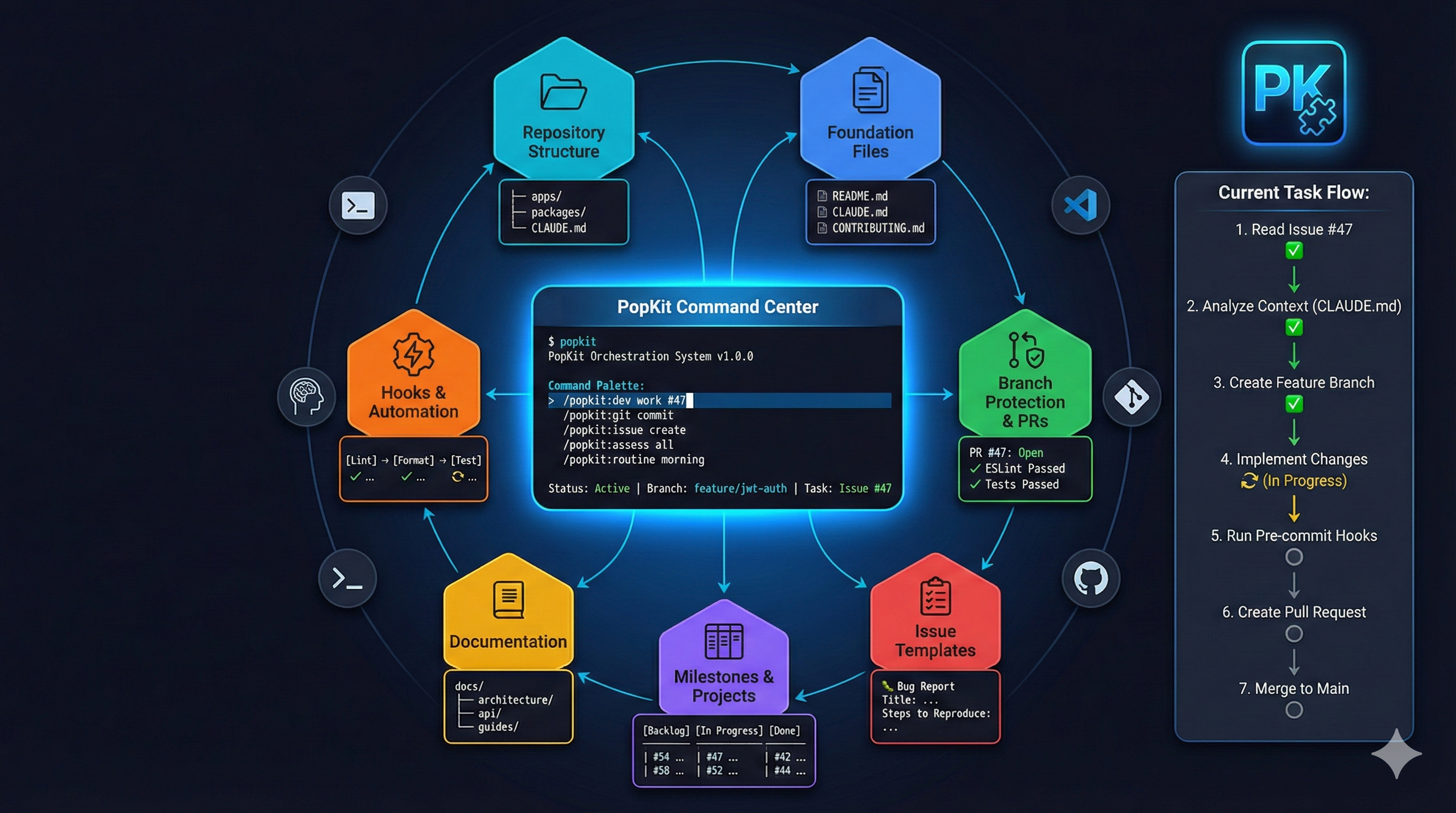
Putting It All Together with PopKit
Part 10 of the Agent-Ready Development Series
The Integration Challenge
Over this series, we’ve covered:
- Repository structure that agents understand
- Foundation files that provide context
- Branch protection and PR workflows
- Issue templates that guide work
- Milestones and project organization
- Documentation as executable context
- Git hooks and automation
- Monorepo architecture
- Human-agent collaboration patterns
Each piece is valuable on its own. But the real power comes from integration—making all these pieces work together seamlessly.
That’s what workflow orchestration is about.
What is Workflow Orchestration?
Workflow orchestration is the coordination of:
- Tools: Git, GitHub, editors, terminal
- Processes: Branching, testing, reviewing, deploying
- Context: Issues, milestones, documentation
- Actions: Reading, writing, committing, pushing
Instead of manually connecting these pieces, orchestration tools handle the coordination—letting you focus on the work.
Without Orchestration:
[Read issue] → [Create branch] → [Read docs] → [Write code] →
[Run tests] → [Fix errors] → [Write commit] → [Push] →
[Create PR] → [Link issue] → [Request review]

With Orchestration:
"Work on issue #47"
→ All steps handled automatically
Introducing PopKit
PopKit is a workflow orchestration plugin for Claude Code . It implements every pattern we’ve discussed in this series—automatically.
PopKit transforms Claude Code into a complete
development workflow system.
The Core Philosophy
- Structure over chaos: Every workflow follows a predictable pattern
- Context everywhere: Relevant information is always available
- Guardrails enable speed: Protection lets you move fast
- Human in the loop: You approve, the AI executes
The Feature Development Workflow
The heart of PopKit is the /popkit:dev command—a structured 7-phase workflow for implementing features:
Phase 1: Discovery
/popkit:dev "Add passwordless login"

PopKit: Starting feature discovery...

Analyzing request: "Add passwordless login"

Related items found:
- Issue #48: Passwordless authentication
- ADR-007: Authentication strategy
- Milestone: v2.0 Authentication Overhaul

Shall I work on issue #48? [Y/n]
PopKit automatically finds related context—issues, documentation, previous decisions.
Phase 2: Exploration
PopKit: Exploring codebase for relevant patterns...

Authentication-related files:
- src/services/auth.ts (main auth service)
- src/routes/auth/ (API endpoints)
- src/middleware/auth.ts (middleware)
- packages/types/src/auth.ts (types)

Similar implementations:
- Password reset uses email tokens (src/services/password-reset.ts)
- Session management pattern (src/services/session.ts)

Current auth flow: [diagram]
Before writing code, PopKit explores what exists—preventing duplicate implementations and ensuring pattern consistency.
Phase 3: Questions
PopKit: I have some questions before proceeding:

1. Token expiration: 15 minutes (like password reset) or different?
2. Should users be able to have multiple active magic links?
3. Rate limit: How many requests per hour?
4. Should magic link login create a new session or merge with existing?

Your answers will shape the implementation.
PopKit identifies ambiguities and asks before implementing—preventing rework.
Phase 4: Architecture
PopKit: Proposed architecture:

New files:
├── src/services/magic-link.ts    (generation, verification)
├── src/routes/auth/magic-link.ts (API endpoints)
└── src/emails/magic-link.tsx     (email template)

Modified files:
├── src/services/auth.ts          (add magic link method)
├── packages/types/src/auth.ts    (new types)
└── prisma/schema.prisma          (MagicLink model)

Dependencies:
- Uses existing: EmailService, SessionService
- Uses existing: Token generation from password-reset

Implementation order:
1. Prisma schema + migration
2. Magic link service
3. API routes
4. Email template
5. Tests

Approve this plan? [Y/n/modify]
You see the full plan before any code is written.
Phase 5: Implementation
PopKit: Beginning implementation...

[1/5] Creating Prisma schema...
      Added MagicLink model
      Migration: 20250215_add_magic_link

[2/5] Implementing magic link service...
      Created src/services/magic-link.ts
      Following pattern from password-reset.ts
      Added rate limiting (5/hour)

[3/5] Creating API routes...
      POST /auth/magic-link (request link)
      GET /auth/magic-link/verify (verify token)
      Added to route index

[4/5] Email template...
      Created src/emails/magic-link.tsx
      Using existing email base template

[5/5] Tests...
      Unit tests: magic-link.service.test.ts
      Integration tests: magic-link.api.test.ts
      Coverage: 94%

✓ All implementation complete
PopKit implements step by step, following the approved plan.
Phase 6: Review
PopKit: Running automated review...

Checks passed:
✓ TypeScript: No errors
✓ ESLint: No violations
✓ Tests: 47 passed
✓ Security: No issues found
✓ Pattern compliance: Matches existing auth patterns

Potential concerns:
⚠ Rate limit might be too restrictive for enterprise users
  Consider: environment variable for customization

Ready for human review? [Y/n]
Before you see the code, PopKit runs all quality checks.
Phase 7: Summary
PopKit: Feature implementation complete.

Changes:
- 5 new files
- 3 modified files
- 1 database migration
- 47 new tests

Commit message:
  feat(auth): add passwordless login with magic links (#48)

  Implements magic link authentication as alternative to password login.
  Users receive a one-time login link via email that expires after 15 minutes.

  - Add MagicLink model and migration
  - Create magic link service with rate limiting
  - Add API endpoints for request and verification
  - Add email template using existing design system
  - Full test coverage for all new code

  Closes #48

Create commit and PR? [Y/n]
One confirmation creates the commit, pushes, and opens the PR.
Git Operations
PopKit handles all git operations with intelligence:
Smart Commits
/popkit:git commit

PopKit: Analyzing changes...

Detected:
- 3 files modified in src/auth/
- 1 new test file
- Related to Issue #48

Suggested commit:
  feat(auth): implement magic link verification flow

  - Add token validation with expiry check
  - Create session on successful verification
  - Delete used tokens immediately
  - Add comprehensive error handling

  Part of #48

[Accept/Edit/Decline]
PR Creation
/popkit:git pr

PopKit: Creating pull request...

Branch: feature/passwordless-login-48
Base: main

PR Title: feat(auth): Add passwordless login (#48)

## Summary
Implements passwordless authentication using magic links.
Users can request a login link sent to their email.

## Changes
- Add MagicLink database model
- Create magic link service with generation and verification
- Add API endpoints for requesting and verifying links
- Add email template for magic links
- Full test coverage

## Test Plan
- [x] Unit tests pass
- [x] Integration tests pass
- [x] Manual testing completed
- [ ] Security review

Closes #48

[Create/Edit/Cancel]
Issue Management
PopKit integrates deeply with GitHub issues:
Creating Issues
/popkit:issue create

PopKit: What type of issue?
1. Bug report
2. Feature request
3. Technical debt
4. Documentation

> 1

PopKit: Describe the bug...

[Interactive prompts gather all template fields]

Created: Issue #52 - Login redirect loop on mobile devices
Labels: bug, priority-high, area-auth
Assigned: @yourname
Working on Issues
/popkit:issue work 52

PopKit: Loading issue #52...

Title: Login redirect loop on mobile devices
Priority: High
Milestone: v2.0

Creating branch: fix/login-redirect-mobile-52
Switching to branch...

Context loaded:
- Issue details
- Related issues: #48 (auth refactor)
- Relevant files: src/pages/Login.tsx

Ready to investigate. What would you like to do?
1. Explore the problem
2. See suggested fixes
3. Start implementing
Project Analysis
PopKit understands your entire project:
/popkit:project analyze

PopKit: Analyzing project structure...

Project: my-app (React + Express monorepo)

Health Score: 87/100

Strengths:
✓ Well-structured monorepo
✓ Comprehensive test coverage (89%)
✓ Good documentation (CLAUDE.md, architecture docs)
✓ Active CI/CD pipeline

Improvements needed:
⚠ 3 ADRs are outdated (last updated 6+ months)
⚠ 12 TODO comments without linked issues
⚠ Dependency updates available (17 packages)
⚠ Missing API documentation for 4 endpoints

Suggested actions:
1. Review and update stale ADRs
2. Convert TODOs to tracked issues
3. Run dependency update workflow
4. Generate API docs from OpenAPI spec

Run any of these? [1-4/skip]
Multi-Agent Power Mode
For complex tasks, PopKit coordinates multiple AI agents — the Navy-inspired multi-agent coordination pattern I built it around:
/popkit:power start "Implement user dashboard"

PopKit: Initiating Power Mode with 5 agents...

Agents activated:
├── Explorer: Analyzing codebase structure
├── Architect: Designing component hierarchy
├── Implementer: Ready for code generation
├── Tester: Preparing test strategy
└── Reviewer: Will perform code review

[Progress bar showing parallel work]

Explorer: Found 3 similar dashboard implementations
Architect: Proposed 4-component structure
Implementer: Created Dashboard.tsx, DashboardStats.tsx
Tester: Generated 23 test cases
Reviewer: No issues found

All agents complete. Consolidating results...

Summary:
- 4 new components created
- 2 shared utilities extracted
- 23 tests with 96% coverage
- Architecture documented in docs/dashboard.md

Review and approve? [Y/n]
Multiple AI agents work in parallel, then their work is consolidated and reviewed.
Daily Routines
PopKit automates recurring workflows:
Morning Routine
/popkit:routine morning

PopKit: Good morning! Running health checks...

Repository Status:
✓ Main branch: All checks passing
✓ Your PRs: 1 needs attention (review requested)
✓ Assigned issues: 3 (1 high priority)
⚠ Stale branch: feature/old-experiment (30 days)

Overnight activity:
- 2 PRs merged
- 1 new issue assigned to you (#54)
- CI recovered from flaky test

Ready-to-Code Score: 92/100

Suggested first task:
Issue #54 (High priority, small scope, good context)

Start working on #54? [Y/n]
What’s Next
/popkit:next

PopKit: Analyzing your current context...

You're on branch: feature/passwordless-login-48
Last commit: 2 hours ago
Tests: Passing

Current issue #48 status:
- Magic link generation ✓
- Email sending ✓
- Verification endpoint ← In progress
- Tests ← Next

Recommended next action:
Complete the verification endpoint, then write tests.

Want me to continue implementation? [Y/n]
The Full Picture
Here’s how PopKit implements everything from this series:
| Series Topic | PopKit Implementation |
|---|---|
| Foundation Files | /popkit:project init generates CLAUDE.md, README, CONTRIBUTING |
| Branch Protection | /popkit:git follows protection rules, creates compliant PRs |
| Issue Templates | /popkit:issue create uses structured templates |
| Milestones | /popkit:milestone provides health analysis |
| Documentation | /popkit:project analyze identifies gaps, generates docs |
| Git Hooks | PopKit hooks provide AI-specific guardrails |
| Monorepos | /popkit:dashboard manages multiple projects |
| Collaboration | /popkit:dev implements structured workflow |
Getting Started with PopKit
Installation
# Install via Claude Code plugin marketplace
claude plugin install popkit

# Or use the suite for all features
claude plugin install popkit-suite
Quick Setup
# In your project
/popkit:project init

PopKit: Analyzing your project...

Detected: TypeScript React app with Express backend

I'll create:
- CLAUDE.md (AI instructions)
- Updated README.md
- CONTRIBUTING.md
- Issue templates
- PR template

Customize or accept defaults? [Customize/Accept]
First Workflow
/popkit:dev "Add user profile page"

# PopKit guides you through:
# Discovery → Exploration → Questions →
# Architecture → Implementation → Review → Summary
Beyond the Basics
PopKit grows with your needs:
Assessments
/popkit:assess security

PopKit: Running security assessment...

[Detailed security scan with findings and recommendations]
Audits
/popkit:audit quarterly

PopKit: Running quarterly health audit...

[Comprehensive codebase analysis: stale code, duplicates, risks]
Research
/popkit:research save "JWT refresh token patterns"

PopKit: Capturing research to knowledge base...

[Research is saved and searchable across sessions]
The Transformation
Before PopKit:
- Manual context loading each session
- Ad-hoc prompting without structure
- Quality checks as afterthoughts
- Disconnected tools and workflows
After PopKit:
- Automatic context from issues, docs, code
- Structured 7-phase workflow
- Quality checks integrated throughout
- Unified workflow orchestration
The repository structure, the documentation, the issues, the automation—it all works together because PopKit connects the pieces.
Start Your Journey
This series has given you the principles. PopKit gives you the implementation.
- Apply the principles - Even without PopKit, the patterns work
- Try PopKit - See how orchestration accelerates everything
- Iterate - Both principles and tooling improve with practice
The future of development is human-agent collaboration. The teams that master this collaboration will build better software, faster.
Your repository is your agent’s workspace. Make it a good one.
Series Conclusion
Thank you for following this 10-part series on Agent-Ready Development. We’ve covered:
- The manifesto: Why structure matters
- Foundation files: Context agents can read
- Branch protection: Guardrails that enable speed
- Issue templates: Structured work definitions
- Milestones: The big picture
- Documentation: Executable context
- Git hooks: Automated quality gates
- Monorepos: Scaling the patterns
- Collaboration: Working with AI daily
- Orchestration: Bringing it all together
The principles are universal. The tools will evolve. But the core insight remains:
The better you structure your work for AI understanding, the more effectively AI can help you work.
Build agent-ready repositories. Work with AI, not just through it. And build something great.
PopKit is the Claude Code toolkit behind all of this — 30+ specialized agents I build and use at Genesis Labs. It’s in active private development; this series is the closest look at how it works.
Questions or feedback? Find me on X or GitHub.