The Agent-Ready Repository Manifesto
Why repository structure matters more than ever in the age of AI-assisted development
The Agent-Ready Repository Manifesto
Part 1 of the Agent-Ready Development Series
The 3am Realization
I was debugging a production issue at 3am when it hit me: my AI assistant was useless.
Not because Claude or Copilot are bad tools. They’re remarkable. But my repository was a maze of implicit knowledge, tribal conventions, and scattered documentation that even I struggled to navigate after six months away.
The AI kept asking: “Where is the authentication logic?” “What testing framework do you use?” “Which branch should I base this on?”
Questions I’d answered a hundred times. Questions that were nowhere in the codebase.
That night, I started rebuilding my repository from the ground up. Not the code—the context.
The Problem We All Have
Here’s the uncomfortable truth: most repositories are write-only.
We write code. We might write a README. We push and move on. The repository becomes a filing cabinet—things go in, and we hope we remember where to find them later.
This worked fine when it was just us and maybe a few teammates. We could hold the context in our heads. We knew that utils/helpers.js was actually critical business logic, and that the tests in /tests were mostly broken but nobody deleted them.
AI assistants don’t have that luxury.
When you ask Claude to “fix the login bug,” it needs to:
- Understand your authentication architecture
- Find the relevant files among thousands
- Know your testing expectations
- Understand your code style and conventions
- Figure out where the bug actually lives
Without explicit context, it’s navigating blindfolded.
The Shift in Perspective
Old thinking: The repository stores my code.
New thinking: The repository is my project’s knowledge base.
This isn’t just semantics. It’s a fundamental shift in how we structure, document, and organize our work.
A knowledge base doesn’t just contain information—it makes that information findable and understandable to anyone who needs it. Including machines.
The Five Principles of Agent-Ready Development
After months of iteration, I’ve distilled what makes a repository truly “agent-ready” into five core principles:
1. Explicit Over Implicit
Every convention, every workflow, every decision—written down.
BAD:  "Everyone knows we use ESLint with the Airbnb config"
GOOD: `.eslintrc.js` exists + README mentions "We use ESLint with Airbnb config"
Agents can read files. They can’t read minds.
2. Predictable Over Clever
Consistency beats creativity in repository structure.
BAD:  src/
      ├── userStuff/
      ├── api-things/
      ├── Utils/
      └── misc/

GOOD: src/
      ├── components/
      ├── services/
      ├── utils/
      └── types/
When an agent can predict where to find something, it doesn’t waste your tokens (or time) searching.
3. Layered Context
Different questions need different levels of detail:
- README.md - “What is this project?”
- CLAUDE.md - “How do I work in this codebase?”
- docs/ - “How does this system work?”
- Code comments - “Why does this specific line exist?”
Each layer adds context without overwhelming.
4. Connected Documentation
Your issues, PRs, milestones, and docs should form a web of context:
Issue #47: "Add dark mode"
├── Links to Milestone: "v2.0 UI Refresh"
├── References: docs/design-system.md
├── PR #52: "Implement dark mode toggle"
│   ├── Closes Issue #47
│   └── Updates: CHANGELOG.md
Agents can follow these threads to build understanding.
5. Guardrails Enable Speed
Branch protection, required reviews, CI checks—these aren’t bureaucracy. They’re safety nets that let you (and AI assistants) move fast with confidence.
# .github/workflows/ci.yml
# Every push is validated. No exceptions. Now we can trust the main branch.
What “Agent-Ready” Actually Looks Like
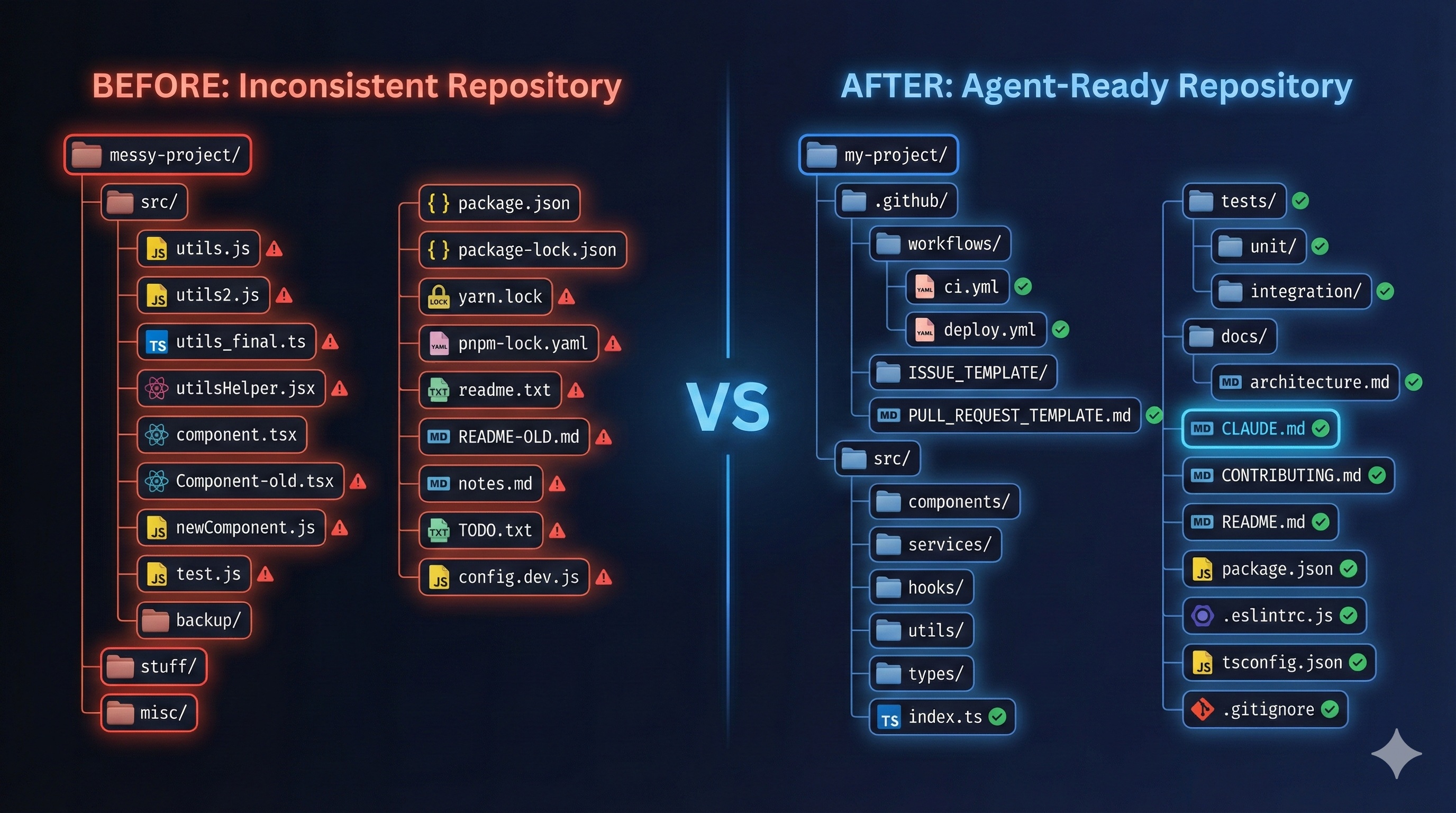
Let me show you the difference:
Before: The Typical Repository
my-project/
├── src/
│   └── (hundreds of files, no organization principle)
├── package.json
├── README.md (3 lines, "A project for doing things")
└── .gitignore
When an AI assistant lands here, it’s lost. It will:
- Read every file to understand the structure
- Make assumptions about conventions
- Ask you questions constantly
- Make mistakes based on incomplete context
After: The Agent-Ready Repository
my-project/
├── .github/
│   ├── ISSUE_TEMPLATE/
│   │   ├── bug_report.md
│   │   ├── feature_request.md
│   │   └── config.yml
│   ├── PULL_REQUEST_TEMPLATE.md
│   └── workflows/
│       ├── ci.yml
│       └── deploy.yml
├── docs/
│   ├── architecture.md
│   ├── getting-started.md
│   └── api-reference.md
├── src/
│   ├── components/     # UI components (React)
│   ├── services/       # Business logic
│   ├── hooks/          # Custom React hooks
│   ├── utils/          # Pure utility functions
│   └── types/          # TypeScript definitions
├── tests/
│   ├── unit/
│   ├── integration/
│   └── e2e/
├── CLAUDE.md           # AI-specific instructions
├── CONTRIBUTING.md     # How to contribute
├── README.md           # Project overview
└── package.json
When an AI assistant lands here, it can:
- Read
CLAUDE.mdfor coding conventions and project specifics - Understand the architecture from
docs/architecture.md - Follow issue templates to create well-structured tasks
- Know exactly where to put new code
- Run the right tests before suggesting changes
The ROI is Real
I tracked my AI-assisted development before and after restructuring:
| Metric | Before | After |
|---|---|---|
| Questions AI asked per feature | 5-8 | 1-2 |
| Time to implement simple feature | 45 min | 15 min |
| AI-introduced bugs | 30% of PRs | 5% of PRs |
| ”Let me check the codebase” delays | Constant | Rare |
The time I invested in repository structure paid itself back within a week.
The Path Forward
This series will walk you through each aspect of agent-ready development:
- Foundation files that give agents the context they need
- Branch protection and PR workflows that enable safe AI contributions
- Issue templates that structure work for machine understanding
- Milestones and project boards that provide big-picture context
- Documentation patterns that serve both humans and AI
- Git hooks and automation that catch problems before they land
- Monorepo strategies for scaling these practices
- Human-agent workflows for day-to-day collaboration
- Orchestration tools that bring it all together
Start Today
You don’t need to restructure everything at once. Start with one thing:
Create a CLAUDE.md file in your repository.
Put these three things in it:
- One sentence about what the project does
- The command to run tests
- Your preferred coding conventions
That’s it. That single file will immediately improve every AI interaction with your codebase.
Coming Next
In Part 2, we’ll dive deep into Foundation Files That Agents Actually Read—the specific files that AI assistants look for, what to put in them, and how to structure information for maximum utility.
This series is based on real patterns I’ve developed while building PopKit—a workflow orchestration plugin for Claude Code that implements these principles. If you want to skip ahead and get tooling that automates much of this structure, check it out. But the principles work regardless of what tools you use.
Have questions or want to share how you structure your repositories? Find me on X or GitHub.
Next up: Part 2 - Foundation Files That Agents Actually Read (coming soon)