Monorepos & Multi-Project Architecture
Scaling agent-ready practices across large, complex codebases
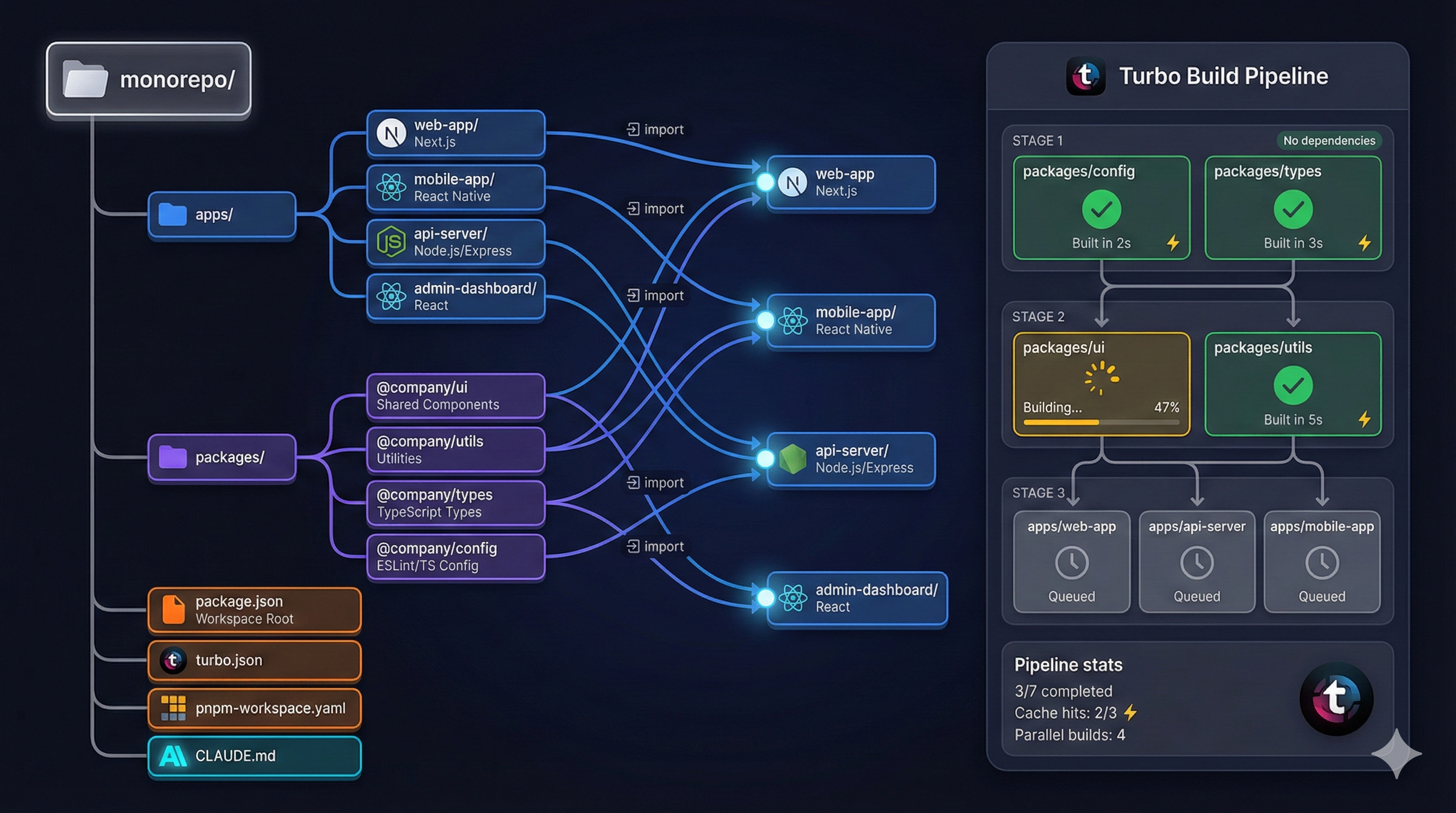
Monorepos & Multi-Project Architecture
Part 8 of the Agent-Ready Development Series
The Scaling Challenge
Everything we’ve discussed works well for single projects. But what happens when you have:
- Multiple applications sharing code
- Teams working on different features simultaneously
- Common packages used across projects
- Different tech stacks coexisting
Suddenly, the simple patterns get complicated. Where does CLAUDE.md live? How do you run tests for just your changes? How does an AI assistant navigate across project boundaries?
Let’s solve this.
Monorepo vs. Multi-Repo
First, let’s be clear about what we’re discussing:
Multi-repo: Each project in its own repository
org/
├── frontend-repo/
├── backend-repo/
├── shared-utils-repo/
└── mobile-repo/Monorepo: All projects in one repository
org-monorepo/
├── apps/
│   ├── frontend/
│   ├── backend/
│   └── mobile/
└── packages/
    └── shared-utils/
Why Monorepos Win for AI Assistance
| Aspect | Multi-repo | Monorepo |
|---|---|---|
| Cross-project context | Must switch repos | Single codebase |
| Shared code changes | Coordinate across repos | Single PR |
| Consistent tooling | Different per repo | One configuration |
| AI navigation | Limited to one repo | Full visibility |
When an AI assistant works in a monorepo, it can:
- See how shared code is used
- Make cross-cutting changes atomically
- Understand the full system architecture
- Follow imports across boundaries
Monorepo Structure
Here’s the structure I recommend:
monorepo/
├── apps/                    # Deployable applications
│   ├── web/                # React frontend
│   ├── api/                # Express backend
│   ├── mobile/             # React Native app
│   └── admin/              # Admin dashboard
├── packages/               # Shared packages
│   ├── ui/                 # Shared UI components
│   ├── utils/              # Shared utilities
│   ├── types/              # Shared TypeScript types
│   ├── config/             # Shared configs (eslint, tsconfig)
│   └── api-client/         # Generated API client
├── tools/                  # Build and development tools
│   ├── scripts/            # Build scripts
│   └── generators/         # Code generators
├── docs/                   # Project-wide documentation
│   ├── architecture.md
│   └── adr/
├── .github/                # GitHub configuration
├── CLAUDE.md               # Root AI instructions
├── package.json            # Root package.json
├── pnpm-workspace.yaml     # Workspace configuration
└── turbo.json              # Turborepo configuration
Workspace Configuration
# pnpm-workspace.yaml
packages:
  - 'apps/*'
  - 'packages/*'
  - 'tools/*'
// package.json (root)
{
"name": "monorepo",
"private": true,
"scripts": {
"dev": "turbo run dev",
"build": "turbo run build",
"test": "turbo run test",
"lint": "turbo run lint",
"typecheck": "turbo run typecheck"
},
"devDependencies": {
"turbo": "^2.0.0"
}
}Turborepo Configuration
Turborepo orchestrates builds across packages:
// turbo.json
{
  "$schema": "https://turbo.build/schema.json",
  "globalDependencies": ["**/.env.*local"],
  "tasks": {
    "build": {
      "dependsOn": ["^build"],
      "outputs": ["dist/**", ".next/**"],
      "cache": true
    },
    "test": {
      "dependsOn": ["build"],
      "inputs": ["src/**", "tests/**"],
      "cache": true
    },
    "lint": {
      "cache": true
    },
    "typecheck": {
      "dependsOn": ["^build"],
      "cache": true
    },
    "dev": {
      "cache": false,
      "persistent": true
    }
  }
}
What this does:
build- Builds packages in dependency order (^build)test- Runs tests after builds completelint- Lints in parallel (no dependencies)typecheck- Type checks after dependencies are builtdev- Runs dev servers persistently
Smart Filtering
Only run tasks for changed packages:
# All affected by changes since main
turbo run test --filter=[origin/main]

# Only the web app and its dependencies
turbo run build --filter=web...

# Only packages that depend on shared-utils
turbo run test --filter=...shared-utils
Multi-Level CLAUDE.md
Each level gets its own AI instructions — the same foundation files idea, scoped per package:
Root CLAUDE.md
# Monorepo AI Development Guide

## Overview

This monorepo contains 4 applications and 5 shared packages.
Use pnpm for package management and Turborepo for orchestration.

## Quick Commands

    pnpm install          # Install all dependencies
    pnpm dev             # Start all apps in dev mode
    pnpm build           # Build all packages and apps
    pnpm test            # Run all tests
    pnpm lint            # Lint all code

## Structure

- `apps/` - Deployable applications
- `packages/` - Shared packages
- `tools/` - Build tools and scripts

## Conventions

- All packages use TypeScript strict mode
- Shared types go in `packages/types`
- Shared UI components go in `packages/ui`
- Import shared packages as `@monorepo/package-name`

## Working on a Specific App

Each app has its own CLAUDE.md with app-specific instructions.
Navigate to `apps/<app-name>/CLAUDE.md` for details.

## Cross-Package Changes

When making changes that affect multiple packages:
1. Start with the lowest-level package
2. Build to verify changes: `pnpm build --filter=package-name`
3. Update dependent packages
4. Run full test suite: `pnpm test`
App-Specific CLAUDE.md
# Web App (apps/web)

## Overview

React 18 SPA with React Query and Zustand.
Deployed to Vercel.

## Quick Commands

    pnpm dev             # Start dev server (port 3000)
    pnpm build           # Production build
    pnpm test            # Run tests
    pnpm typecheck       # Type validation

## Dependencies

This app depends on:
- `@monorepo/ui` - Shared components
- `@monorepo/types` - TypeScript types
- `@monorepo/api-client` - API client

## Architecture

    src/
    ├── components/      # App-specific components
    ├── features/        # Feature modules
    ├── hooks/           # Custom hooks
    ├── pages/           # Route pages
    └── stores/          # Zustand stores

## Code Conventions

- Use UI components from `@monorepo/ui` when available
- Place feature-specific components in `src/features/<feature>/components/`
- Use React Query for all API data fetching
- See root CLAUDE.md for monorepo-wide conventions
Package-Specific CLAUDE.md
# Shared UI Package (packages/ui)

## Overview

Shared React component library used by all web apps.
Built with Tailwind CSS and Radix UI primitives.

## Quick Commands

    pnpm build           # Build the package
    pnpm test            # Run component tests
    pnpm storybook       # Start Storybook

## Adding Components

1. Create component in `src/components/ComponentName/`
2. Export from `src/components/index.ts`
3. Add story in `src/components/ComponentName/ComponentName.stories.tsx`
4. Add tests in `src/components/ComponentName/ComponentName.test.tsx`

## Design System

- Colors: Use design tokens from `src/tokens/`
- Spacing: 4px base unit (1 = 4px, 2 = 8px, etc.)
- Typography: System font stack, see `src/tokens/typography.ts`

## Consuming This Package

Apps import from `@monorepo/ui`:

    import { Button, Input, Modal } from '@monorepo/ui';
Shared Configuration Packages
Don’t repeat configuration—share it:
ESLint Config Package
// packages/config/eslint/package.json
{
  "name": "@monorepo/eslint-config",
  "main": "index.js",
  "dependencies": {
    "@typescript-eslint/eslint-plugin": "^6.0.0",
    "@typescript-eslint/parser": "^6.0.0",
    "eslint-plugin-react": "^7.33.0",
    "eslint-plugin-react-hooks": "^4.6.0"
  }
}
// packages/config/eslint/index.js
module.exports = {
parser: '@typescript-eslint/parser',
plugins: ['@typescript-eslint', 'react', 'react-hooks'],
extends: [
'eslint:recommended',
'plugin:@typescript-eslint/recommended',
'plugin:react/recommended',
'plugin:react-hooks/recommended'
],
rules: {
// Shared rules across all packages
}
};// apps/web/.eslintrc.js
module.exports = {
extends: ['@monorepo/eslint-config'],
rules: {
// App-specific overrides
}
};TypeScript Config Package
// packages/config/tsconfig/base.json
{
  "compilerOptions": {
    "target": "ES2022",
    "lib": ["ES2022"],
    "module": "ESNext",
    "moduleResolution": "Bundler",
    "strict": true,
    "esModuleInterop": true,
    "skipLibCheck": true,
    "declaration": true,
    "declarationMap": true,
    "composite": true
  }
}
// packages/config/tsconfig/react.json
{
"extends": "./base.json",
"compilerOptions": {
"lib": ["ES2022", "DOM", "DOM.Iterable"],
"jsx": "react-jsx"
}
}// apps/web/tsconfig.json
{
"extends": "@monorepo/tsconfig/react.json",
"compilerOptions": {
"baseUrl": ".",
"paths": {
"@/*": ["./src/*"]
}
},
"include": ["src"],
"references": [
{ "path": "../../packages/ui" },
{ "path": "../../packages/types" }
]
}Cross-Package Dependencies
Internal Package Imports
// apps/web/package.json
{
  "name": "web",
  "dependencies": {
    "@monorepo/ui": "workspace:*",
    "@monorepo/types": "workspace:*",
    "@monorepo/api-client": "workspace:*"
  }
}
The workspace:* protocol tells pnpm to use the local package.
Build Order with References
// apps/web/tsconfig.json
{
  "references": [
    { "path": "../../packages/ui" },
    { "path": "../../packages/types" }
  ]
}
TypeScript builds dependencies first automatically.
AI Navigation Patterns
Help AI assistants navigate your monorepo:
Navigation Documentation
# Package Map

## Finding Code

| What you need | Where to look |
|--------------|---------------|
| React components | `packages/ui/src/` |
| API types | `packages/types/src/api/` |
| Web app pages | `apps/web/src/pages/` |
| API endpoints | `apps/api/src/routes/` |
| Database models | `apps/api/src/models/` |

## Package Dependencies

    apps/web
    ├── @monorepo/ui
    ├── @monorepo/types
    └── @monorepo/api-client
           └── @monorepo/types

    apps/api
    ├── @monorepo/types
    └── @monorepo/utils

    apps/mobile
    ├── @monorepo/types
    └── @monorepo/api-client
           └── @monorepo/types
Cross-References in Code
// apps/web/src/features/user/UserProfile.tsx

/**
 * User profile page component.
 *
 * Related:
 * - API endpoint: apps/api/src/routes/users.ts
 * - Types: packages/types/src/api/user.ts
 * - UI components: packages/ui/src/components/Avatar/
 */
export function UserProfile() {
  // ...
}
Monorepo CI/CD
Efficient Pipeline
# .github/workflows/ci.yml
name: CI

on:
  push:
    branches: [main]
  pull_request:

jobs:
  changes:
    runs-on: ubuntu-latest
    outputs:
      packages: ${{ steps.filter.outputs.changes }}
    steps:
      - uses: actions/checkout@v4
      - uses: dorny/paths-filter@v2
        id: filter
        with:
          filters: |
            web:
              - 'apps/web/**'
              - 'packages/ui/**'
              - 'packages/types/**'
            api:
              - 'apps/api/**'
              - 'packages/types/**'
            ui:
              - 'packages/ui/**'

  test-web:
    needs: changes
    if: contains(needs.changes.outputs.packages, 'web')
    runs-on: ubuntu-latest
    steps:
      - uses: actions/checkout@v4
      - uses: pnpm/action-setup@v2
      - uses: actions/setup-node@v4
        with:
          node-version: '20'
          cache: 'pnpm'
      - run: pnpm install
      - run: pnpm turbo run test --filter=web...

  test-api:
    needs: changes
    if: contains(needs.changes.outputs.packages, 'api')
    runs-on: ubuntu-latest
    steps:
      - uses: actions/checkout@v4
      - uses: pnpm/action-setup@v2
      - uses: actions/setup-node@v4
        with:
          node-version: '20'
          cache: 'pnpm'
      - run: pnpm install
      - run: pnpm turbo run test --filter=api...
Only tests what changed—fast CI even in large monorepos.
Deploy Filtering
deploy-web:
  needs: [changes, test-web]
  if: |
    github.ref == 'refs/heads/main' &&
    contains(needs.changes.outputs.packages, 'web')
  runs-on: ubuntu-latest
  steps:
    - uses: actions/checkout@v4
    - run: pnpm turbo run build --filter=web
    - run: npx vercel deploy --prod
Quick Wins: What to Do Today
Starting Fresh
- Create monorepo structure with pnpm workspaces
- Add Turborepo for orchestration
- Create shared config packages
- Write root CLAUDE.md
Converting Existing Repos
- Create new monorepo skeleton
- Move existing project into
apps/ - Extract shared code to
packages/ - Update import paths
- Configure Turborepo pipeline
Improving Existing Monorepo
- Add multi-level CLAUDE.md files
- Create package dependency map
- Optimize CI with change detection
- Add cross-reference comments
Coming Next
In Part 9, we’ll explore The Human-Agent Collaboration Workflow—practical patterns for working alongside AI assistants day-to-day, from pair programming to code review.
Monorepo management is a strength of PopKit. The /popkit:dashboard command manages multiple projects, while /popkit:project analyze understands monorepo structures and provides package-aware recommendations. PopKit’s agents are context-aware across package boundaries, making cross-cutting changes smooth.
← Part 7: Hooks & Automation | Part 9: Human-Agent Workflow →