Git Hooks & Automation Pipelines
Programmatic quality gates that catch issues before they become problems
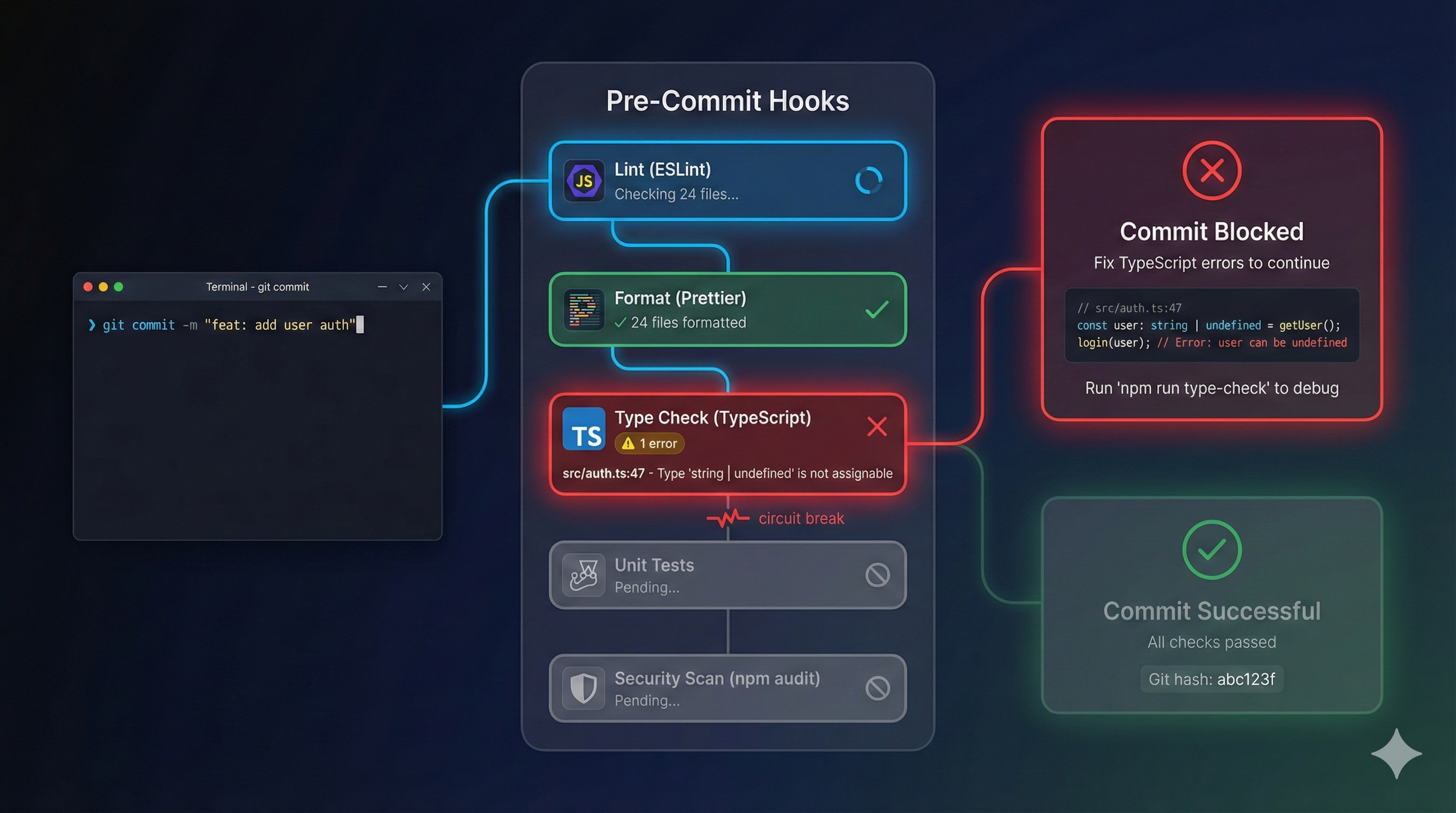
Git Hooks & Automation Pipelines
Part 7 of the Agent-Ready Development Series
The Last Line of Defense
We’ve set up branch protection, PR templates, and CI pipelines. But there’s a gap: the time between “developer writes code” and “CI catches the problem.”
That gap can be hours. Sometimes days if PRs sit in review.
Git hooks close that gap. They catch problems before code leaves the developer’s machine. And for AI assistants, hooks are even more valuable—they provide immediate feedback that shapes better output.
The Hook Hierarchy
There are two levels of automation:
Local Hooks (Pre-commit, Pre-push)
Run on the developer’s machine before code is shared.
- Fast feedback: Seconds, not minutes
- Developer experience: Catch issues early
- AI benefit: Immediate correction opportunity
Remote Hooks (CI/CD)
Run on the server after code is pushed.
- Comprehensive: Can run expensive tests
- Environment-controlled: Consistent execution
- Authority: Ultimate source of truth
Both are necessary. Local hooks for speed, remote for thoroughness.
Setting Up Git Hooks with Husky
Husky is the de facto standard for managing Git hooks in JavaScript projects:
Installation
npm install --save-dev husky lint-staged
npx husky init
This creates:
.husky/
├── _/
│   ├── .gitignore
│   └── husky.sh
└── pre-commit
Pre-commit Hook
# .husky/pre-commit
# (Husky v9+: hook files are just the commands — the old shebang and
#  `. "$(dirname "$0")/_/husky.sh"` sourcing line are deprecated and removed in v10.)
npx lint-staged
Lint-staged Configuration
// package.json
{
  "lint-staged": {
    "*.{ts,tsx}": [
      "eslint --fix",
      "prettier --write"
    ],
    "*.{json,md,yml}": [
      "prettier --write"
    ],
    "*.test.{ts,tsx}": [
      "vitest related --run"
    ]
  }
}
What this does:
- TypeScript files: Auto-fix lint issues, format code
- Config/docs: Format consistently
- Test files: Run related tests
Only staged files are processed—fast even in large codebases.
The Complete Hook Arsenal
Pre-commit: Fast Checks
#!/bin/sh
# .husky/pre-commit

echo "🔍 Running pre-commit checks..."

# Lint and format staged files
npx lint-staged

# Type check (fast, only changed files)
npx tsc --noEmit --incremental

# Check for console.log statements (optional)
if git diff --cached --name-only | xargs grep -l 'console.log' 2>/dev/null; then
  echo "⚠️  Warning: console.log statements detected"
  # Uncomment to make this a blocking error:
  # exit 1
fi

echo "✅ Pre-commit checks passed"
Commit-msg: Validate Messages
#!/bin/sh
# .husky/commit-msg

npx --no -- commitlint --edit "$1"
With config:
// commitlint.config.js
module.exports = {
  extends: ['@commitlint/config-conventional'],
  rules: {
    'type-enum': [
      2,
      'always',
      ['feat', 'fix', 'docs', 'style', 'refactor', 'perf', 'test', 'chore', 'ci']
    ],
    'subject-case': [2, 'always', 'lower-case'],
    'header-max-length': [2, 'always', 72]
  }
};
Pre-push: Comprehensive Checks
#!/bin/sh
# .husky/pre-push

echo "🚀 Running pre-push checks..."

# Full type check
npm run typecheck

# Run tests
npm run test

# Build to catch any build errors
npm run build

echo "✅ Pre-push checks passed"
Agent Hooks (Claude Code)
Hooks are tool-specific — unlike the AGENTS.md standard, there’s no cross-vendor standard for them yet. Claude Code’s implementation is the most mature, so I’ll use it here; the idea — deterministic shell commands fired on agent events — transfers to other tools.
One thing to get right: Claude Code hooks are not scripts the agent discovers by filename. You register them in .claude/settings.json, mapping an event (like PreToolUse) to a matcher and a command. The command receives a JSON payload on stdin and signals back through its exit code — exit 2 blocks the action and feeds your stderr message back to Claude — or a small JSON object on stdout.
Register hooks in settings.json
// .claude/settings.json
{
  "hooks": {
    "PreToolUse": [
      { "matcher": "Edit|Write", "hooks": [{ "type": "command", "command": ".claude/hooks/protect-files.py" }] }
    ],
    "PostToolUse": [
      { "matcher": "Edit|Write", "hooks": [{ "type": "command", "command": ".claude/hooks/typecheck.py" }] }
    ]
  }
}
PreToolUse: block edits to protected files
The command gets the event JSON on stdin — including tool_name and tool_input. Exit 2 to block the action and send the reason back to Claude:
#!/usr/bin/env python3
# .claude/hooks/protect-files.py  (referenced from settings.json)
import sys, json

data = json.load(sys.stdin)        # { session_id, hook_event_name, tool_name, tool_input, ... }
tool = data.get("tool_name", "")
path = data.get("tool_input", {}).get("file_path", "")

PROTECTED = (".env", ".env.production", "package-lock.json")
if tool in ("Edit", "Write") and path.endswith(PROTECTED):
    print(f"Refusing to touch {path}: protected file.", file=sys.stderr)
    sys.exit(2)                    # exit 2 = block; stderr is shown to Claude

sys.exit(0)                        # exit 0 = allow
PostToolUse: type-check after edits
PostToolUse runs after the tool succeeds. Re-run a type check and, if it fails, exit 2 so Claude sees the errors and fixes them:
#!/usr/bin/env python3
# .claude/hooks/typecheck.py
import sys, json, subprocess

data = json.load(sys.stdin)
path = data.get("tool_input", {}).get("file_path", "")
if path.endswith((".ts", ".tsx")):
    r = subprocess.run(["npx", "tsc", "--noEmit"], capture_output=True, text=True)
    if r.returncode != 0:
        print(r.stdout or r.stderr, file=sys.stderr)
        sys.exit(2)                # feed the type errors back to Claude

sys.exit(0)
There’s more surface than this — UserPromptSubmit can inject context, and hooks can return a structured hookSpecificOutput object (for example a permissionDecision of allow / deny / ask) instead of relying on exit codes. Read it from the source, not a blog (this one included): the Claude Code hooks reference.
Automation Pipeline Design
Beyond hooks, your CI pipeline should have layers:
Layer 1: Instant Checks (< 30 seconds)
# .github/workflows/ci.yml
lint:
  runs-on: ubuntu-latest
  steps:
    - uses: actions/checkout@v4
    - uses: actions/setup-node@v4
      with:
        node-version: '20'
        cache: 'npm'
    - run: npm ci
    - run: npm run lint
    - run: npm run typecheck
Layer 2: Fast Tests (< 5 minutes)
test:
  runs-on: ubuntu-latest
  needs: lint
  steps:
    - uses: actions/checkout@v4
    - uses: actions/setup-node@v4
      with:
        node-version: '20'
        cache: 'npm'
    - run: npm ci
    - run: npm run test:unit
Layer 3: Integration Tests (< 15 minutes)
integration:
  runs-on: ubuntu-latest
  needs: test
  services:
    postgres:
      image: postgres:15
      env:
        POSTGRES_PASSWORD: test
      options: >-
        --health-cmd pg_isready
        --health-interval 10s
        --health-timeout 5s
        --health-retries 5
  steps:
    - uses: actions/checkout@v4
    - uses: actions/setup-node@v4
      with:
        node-version: '20'
        cache: 'npm'
    - run: npm ci
    - run: npm run test:integration
      env:
        DATABASE_URL: postgresql://postgres:test@localhost:5432/test
Layer 4: E2E Tests (Optional, expensive)
e2e:
  runs-on: ubuntu-latest
  needs: integration
  if: github.ref == 'refs/heads/main'  # Only on main branch
  steps:
    - uses: actions/checkout@v4
    - uses: actions/setup-node@v4
      with:
        node-version: '20'
        cache: 'npm'
    - run: npm ci
    - run: npx playwright install --with-deps
    - run: npm run test:e2e
Hook Best Practices
1. Fast Local, Thorough Remote
Local hooks:
  - Lint (< 5s)
  - Format (< 2s)
  - Type check (< 10s)
  - Unit tests for changed files (< 10s)
  Total: < 30 seconds

Remote CI:
  - Full lint
  - Full type check
  - All unit tests
  - Integration tests
  - E2E tests
  - Security scans
  - Build verification
  Total: 5-15 minutes
2. Provide Bypass for Emergencies
# Skip pre-commit hooks (use sparingly!)
git commit --no-verify -m "hotfix: emergency production fix"
Document when this is acceptable (never for regular development).
3. Cache Aggressively
# .github/workflows/ci.yml
- uses: actions/cache@v4
  with:
    path: |
      ~/.npm
      node_modules
      .turbo
    key: ${{ runner.os }}-modules-${{ hashFiles('**/package-lock.json') }}
    restore-keys: |
      ${{ runner.os }}-modules-
4. Fail Fast, Fail Loud
jobs:
  lint:
    runs-on: ubuntu-latest
    steps:
      - run: npm run lint
        continue-on-error: false  # Stop immediately on failure
5. Parallel Where Possible
jobs:
  lint:
    runs-on: ubuntu-latest
    # No dependencies - runs immediately

  typecheck:
    runs-on: ubuntu-latest
    # No dependencies - runs in parallel with lint

  test:
    runs-on: ubuntu-latest
    needs: [lint, typecheck]  # Waits for both
The Feedback Loop
When an AI assistant triggers a hook failure, it gets immediate feedback:
$ git commit -m "add user feature"

🔍 Running pre-commit checks...

✖ eslint found 2 errors:
  src/user.ts:15:5 - 'userId' is defined but never used
  src/user.ts:23:10 - Unexpected console.log statement

❌ Pre-commit checks failed

AI Assistant: I see the pre-commit checks failed. Let me fix these issues:
1. Removing unused 'userId' variable
2. Removing console.log statement

[Makes corrections]

$ git commit -m "add user feature"

🔍 Running pre-commit checks...
✅ Pre-commit checks passed
[main abc123] add user feature
The hook provides:
- Specific error locations
- Clear error messages
- Immediate feedback
The AI corrects and tries again. This loop happens in seconds, not hours.
Monitoring Hook Health
Track how often hooks catch issues:
# .github/workflows/hook-metrics.yml
name: Hook Metrics

on:
  push:
    branches: [main]

jobs:
  collect:
    runs-on: ubuntu-latest
    steps:
      - uses: actions/checkout@v4
        with:
          fetch-depth: 100

      - name: Count commits with no-verify
        run: |
          count=$(git log --oneline -100 | grep -c "no-verify\|--no-v" || true)
          echo "no_verify_commits=$count" >> $GITHUB_OUTPUT

      - name: Report
        if: steps.collect.outputs.no_verify_commits > 5
        run: |
          echo "⚠️ High number of --no-verify commits detected"
Quick Wins: What to Do Today
Minimum (15 minutes)
- Install Husky:
npm install --save-dev husky && npx husky init - Add pre-commit lint:
echo "npx eslint ." > .husky/pre-commit - Test it: Make a linting error, try to commit
Better (1 hour)
- Configure lint-staged for smart file selection
- Add commit message validation
- Add pre-push type checking
Complete (3 hours)
- Full pre-commit hook suite
- Claude Code hooks for AI safety
- Multi-stage CI pipeline
- Hook bypass documentation
- Metrics collection
Coming Next
In Part 8, we’ll explore Monorepos & Multi-Project Architecture—scaling agent-ready practices across large, complex codebases with multiple applications and shared code.
Hook management is deeply integrated into PopKit. PopKit’s hook system provides sophisticated context injection, tool filtering, and quality gates specifically designed for AI-assisted development. The /popkit:dev workflow automatically ensures your changes pass all configured hooks before creating PRs.
← Part 6: Documentation as Context | Part 8: Monorepo Architecture →