Branch Protection & PR Workflows for AI Collaboration
Creating guardrails that protect your codebase while enabling AI contributions
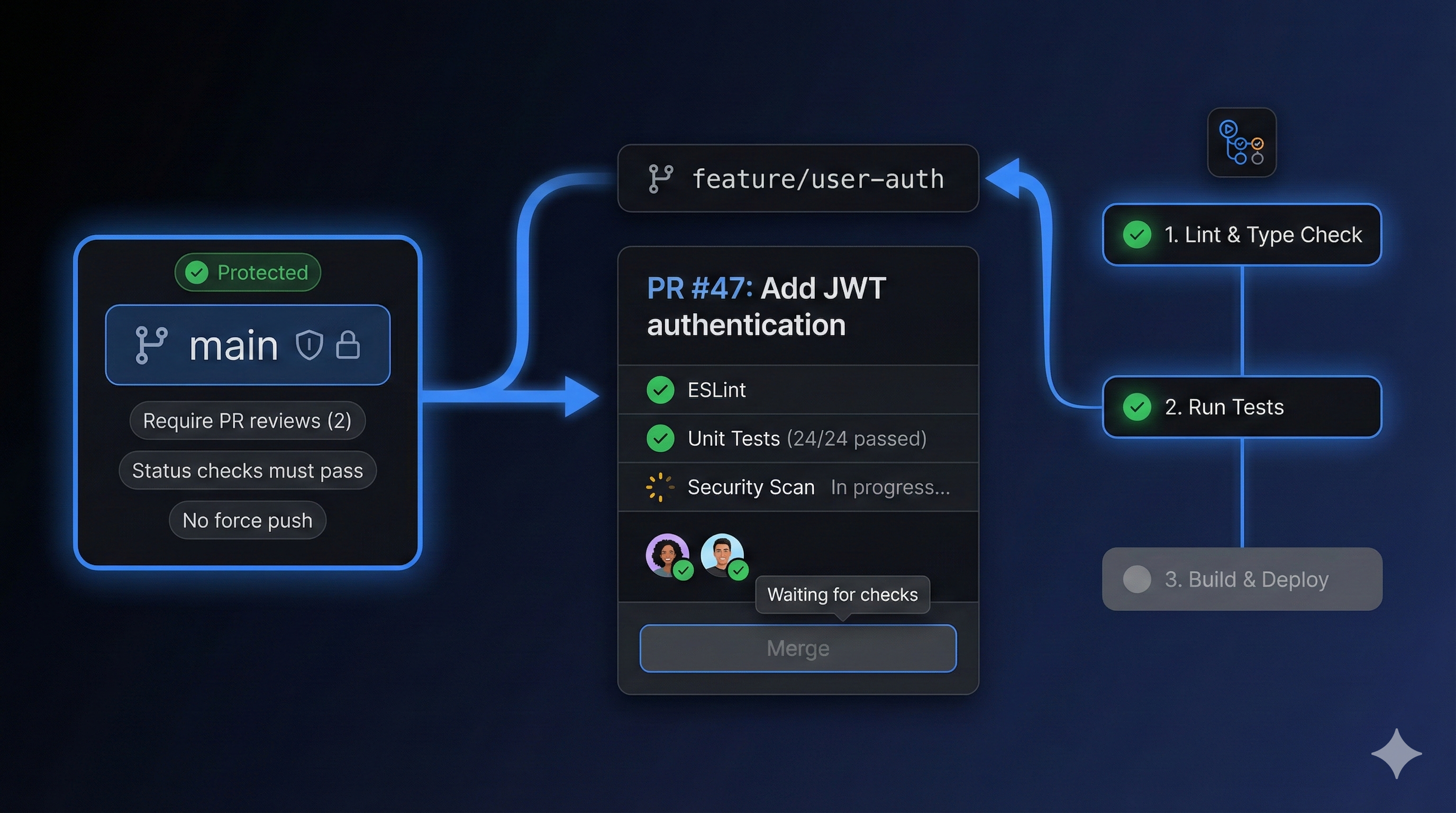
Branch Protection & PR Workflows for AI Collaboration
Part 3 of the Agent-Ready Development Series
The Trust Problem
“Should I let the AI push directly to main?”
I get this question constantly. And the answer is always the same: No. And also, no human should push directly to main either.
This isn’t about distrusting AI. It’s about creating an environment where:
- Mistakes get caught before they cause problems
- Every change is reviewable and reversible
- Quality gates are automated, not optional
- Both humans and AI can move fast with confidence
The paradox: More guardrails = More speed. Not less.
The Anatomy of a Protected Workflow
Here’s what a properly protected git workflow looks like:
main (protected)
  │
  ├── develop (semi-protected)
  │     │
  │     ├── feature/user-auth
  │     ├── feature/dark-mode
  │     └── fix/login-bug
  │
└── release/v2.0 (protected)main: Production code. Always deployable. Always protected. develop: Integration branch. PRs merge here first. feature/: Short-lived branches where work happens. release/: Preparation branches for releases.
Setting Up Branch Protection (GitHub)
Here’s the complete configuration I use:
Step 1: Navigate to Settings
Repository → Settings → Branches → Add branch protection rule
Step 2: Configure main Branch
Branch name pattern: main

✓ Require a pull request before merging
  ✓ Require approvals: 1
  ✓ Dismiss stale PR approvals when new commits are pushed
  ✓ Require review from Code Owners

✓ Require status checks to pass before merging
  ✓ Require branches to be up to date
  Status checks:
    - build
    - test
    - lint
    - typecheck

✓ Require conversation resolution before merging

✓ Require signed commits (optional but recommended)

✓ Require linear history

✓ Do not allow bypassing the above settings
  (Even for admins)

✗ Allow force pushes (NEVER on main)
✗ Allow deletions (NEVER on main)
Step 3: Configure develop Branch
Branch name pattern: develop

✓ Require a pull request before merging
  ✓ Require approvals: 1

✓ Require status checks to pass before merging
  Status checks:
    - build
    - test

✓ Require linear history

✓ Allow force pushes by actors
  - CI bot (for automated updates)
The CI Pipeline That Enables AI
Your CI pipeline is what makes branch protection actually useful. Here’s a complete GitHub Actions workflow:
# .github/workflows/ci.yml
name: CI

on:
  push:
    branches: [main, develop]
  pull_request:
    branches: [main, develop]

concurrency:
  group: ${{ github.workflow }}-${{ github.ref }}
  cancel-in-progress: true

jobs:
  build:
    runs-on: ubuntu-latest
    steps:
      - uses: actions/checkout@v4

      - uses: actions/setup-node@v4
        with:
          node-version: '20'
          cache: 'npm'

      - run: npm ci

      - run: npm run build

      - uses: actions/upload-artifact@v4
        with:
          name: build
          path: dist/

  test:
    runs-on: ubuntu-latest
    needs: build
    steps:
      - uses: actions/checkout@v4

      - uses: actions/setup-node@v4
        with:
          node-version: '20'
          cache: 'npm'

      - run: npm ci

      - run: npm run test:coverage

      - uses: codecov/codecov-action@v4
        with:
          files: ./coverage/lcov.info

  lint:
    runs-on: ubuntu-latest
    steps:
      - uses: actions/checkout@v4

      - uses: actions/setup-node@v4
        with:
          node-version: '20'
          cache: 'npm'

      - run: npm ci

      - run: npm run lint

  typecheck:
    runs-on: ubuntu-latest
    steps:
      - uses: actions/checkout@v4

      - uses: actions/setup-node@v4
        with:
          node-version: '20'
          cache: 'npm'

      - run: npm ci

      - run: npm run typecheck

  security:
    runs-on: ubuntu-latest
    steps:
      - uses: actions/checkout@v4

      - run: npm audit --audit-level=high

      - uses: github/codeql-action/analyze@v3
Why This Matters for AI
When an AI assistant creates a PR:
- build - Confirms the code compiles
- test - Confirms existing functionality isn’t broken
- lint - Confirms code style is correct
- typecheck - Confirms types are valid
- security - Confirms no vulnerabilities introduced
If any check fails, the PR can’t merge. The AI knows immediately what to fix.
PR Templates That Guide AI
Create a PR template that structures information for both humans and AI:
<!-- .github/PULL_REQUEST_TEMPLATE.md -->

## Summary

<!-- 1-3 sentences: What does this PR do? -->

## Changes

<!-- Bullet list of specific changes -->
-
-
-

## Related

<!-- Link to issue, previous PRs, docs -->
Closes #

## Type of Change

<!-- Check all that apply -->
- [ ] Bug fix (non-breaking)
- [ ] New feature (non-breaking)
- [ ] Breaking change
- [ ] Documentation update
- [ ] Refactoring (no functional change)
- [ ] Performance improvement

## Testing

<!-- How was this tested? -->
- [ ] Unit tests added/updated
- [ ] Integration tests added/updated
- [ ] Manual testing performed

### Test Commands

(bash commands to verify this PR)
npm run test

## Checklist

- [ ] Code follows project style guidelines
- [ ] Self-review completed
- [ ] Comments added for complex logic
- [ ] Documentation updated if needed
- [ ] No console.logs or debugging code
- [ ] All tests passing

## Screenshots (if UI change)

(Before/after screenshots)
How AI Uses This
When you ask Claude to “create a PR for this feature,” it will:
- Fill in each section systematically
- Link to the relevant issue
- Check off applicable items
- Include appropriate test commands
- Provide a clear summary
The template is essentially a checklist for the AI.
The Commit Message Standard
Conventional Commits aren’t just for changelogs—they’re machine-parseable context:
<type>(<scope>): <description>

[optional body]

[optional footer(s)]
Types
feat:     New feature
fix:      Bug fix
docs:     Documentation only
style:    Code style (formatting, semicolons)
refactor: Neither feat nor fix
perf:     Performance improvement
test:     Adding/updating tests
chore:    Maintenance tasks
ci:       CI/CD changes
Examples
feat(auth): add passwordless login option

Implements magic link authentication as alternative to password.
Uses existing email service for delivery.

Closes #123

---

fix(dashboard): prevent crash when data is null

Added null check before accessing nested properties.
This was causing blank screens for new users.

Fixes #456

---

refactor(api): extract validation middleware

No functional change. Moved validation logic from individual
routes to reusable middleware for consistency.
Enforcing Commits
Add a commit-lint check to CI (you can also enforce it locally with a commit-msg git hook ):
# .github/workflows/ci.yml (add this job)
commitlint:
  runs-on: ubuntu-latest
  steps:
    - uses: actions/checkout@v4
      with:
        fetch-depth: 0

    - uses: wagoid/commitlint-github-action@v5
And the config:
// commitlint.config.js
module.exports = {
  extends: ['@commitlint/config-conventional'],
  rules: {
    'scope-enum': [2, 'always', [
      'auth', 'api', 'ui', 'db', 'docs', 'ci', 'config'
    ]],
    'subject-case': [2, 'always', 'lower-case'],
    'body-max-line-length': [0, 'always', Infinity]
  }
};
Code Owners: Who Reviews What
CODEOWNERS files route PRs to the right reviewers automatically:
# .github/CODEOWNERS

# Default owners
* @team-lead

# Frontend
/src/components/ @frontend-team
/src/styles/ @frontend-team

# Backend
/src/api/ @backend-team
/src/services/ @backend-team

# Security-sensitive
/src/auth/ @security-team @team-lead
/.env.example @security-team

# Infrastructure
/.github/ @devops-team
/Dockerfile @devops-team
/docker-compose.yml @devops-team

# Documentation
/docs/ @docs-team
*.md @docs-team
The AI Angle
When an AI creates a PR touching /src/auth/, it knows:
- Security team will review
- Higher scrutiny expected
- Maybe add extra context about security implications
The Two-Branch Strategy (Simplified)
For smaller teams or solo developers, the full Git Flow is overkill. Here’s a simpler approach:
main (production, protected)
  │
  └── feature branches
        ├── feature/new-feature
        ├── fix/bug-fix
        └── chore/update-deps
Rules
mainis always deployable- All work happens in feature branches
- Feature branches are short-lived (days, not weeks)
- Merge via PR, always squash
- Delete branch after merge
Branch Naming Convention
feature/description-of-feature
fix/description-of-bug
docs/what-is-being-documented
refactor/what-is-being-refactored
chore/maintenance-task
AI assistants follow these conventions perfectly when you document them in CLAUDE.md.
Automating the Workflow
Auto-assign Reviewers
# .github/workflows/auto-assign.yml
name: Auto Assign

on:
  pull_request:
    types: [opened, ready_for_review]

jobs:
  assign:
    runs-on: ubuntu-latest
    steps:
      - uses: kentaro-m/auto-assign-action@v1
        with:
          configuration-path: .github/auto-assign.yml
# .github/auto-assign.yml
addReviewers: true
addAssignees: true
numberOfReviewers: 1
reviewers:
- reviewer1
- reviewer2
- reviewer3Auto-label PRs
# .github/workflows/labeler.yml
name: Labeler

on:
  pull_request:
    types: [opened, synchronize]

jobs:
  label:
    runs-on: ubuntu-latest
    steps:
      - uses: actions/labeler@v5
        with:
          repo-token: ${{ secrets.GITHUB_TOKEN }}
# .github/labeler.yml
frontend:
- 'src/components/**'
- 'src/styles/**'
backend:
- 'src/api/**'
- 'src/services/**'
documentation:
- '**/*.md'
- 'docs/**'
tests:
- '**/*.test.ts'
- '**/*.spec.ts'The AI Workflow in Action
Here’s what happens when you tell Claude: “Fix the login bug in issue #47”
- Claude reads issue #47 for context
- Creates branch:
fix/login-redirect-bug-47 - Makes changes following CLAUDE.md conventions
- Commits:
fix(auth): prevent redirect loop on login (#47) - Creates PR using the template
- CI runs automatically:
- Build passes ✓
- Tests pass ✓
- Lint passes ✓
- Types valid ✓
- CODEOWNERS routes to right reviewer
- Reviewer approves (or requests changes)
- Squash merge to main
- Branch auto-deleted
The entire process is structured, predictable, and safe.
Quick Wins: What to Do Today
Minimum Viable Protection (5 minutes)
- Go to Repository → Settings → Branches
- Add rule for
main:- ✓ Require PR before merging
- ✓ Require 1 approval
- Done.
Better Protection (30 minutes)
- Add basic CI workflow (build + test)
- Require status checks to pass
- Add PR template
- Document branch naming in CLAUDE.md
Full Protection (2 hours)
- Complete CI with lint, typecheck, security
- Add CODEOWNERS file
- Configure commit linting
- Set up auto-assignment and labeling
- Enable signed commits
Coming Next
In Part 4, we’ll dive into Issue Templates That Guide AI Assistants—structuring your issues so that AI agents have all the context they need to actually solve problems.
Branch protection and PR workflows are core to how PopKit manages development. The /popkit:git commands handle commit messages, PR creation, and branch management following these exact patterns—automatically generating conventional commits and properly structured PRs.