Branch Protection & PR Workflows for AI Collaboration
Creating guardrails that protect your codebase while enabling AI contributions
Part 9 of the Agent-Ready Development Series
Most developers use AI assistants like a search engine: ask a question, get an answer, move on.
But the real productivity gains come from treating AI as a collaborator—an entity you work with rather than query. This requires a different mindset and different practices.
Let’s explore how to develop a true collaboration workflow.
There’s a spectrum of AI involvement:
Low Involvement                              High Involvement
──────────────────────────────────────────────────────────────
   │                    │                    │
"How do I...?"    "Review this"      "Implement this"
   │                    │                    │
Quick answer Feedback loop Autonomous workThe key is knowing which mode to use when.
Here’s how I structure my day with AI assistance:
8:00 - Review overnight changes
       "What PRs were merged since yesterday?"

8:15 - Check issue priorities
       "What's the highest priority issue for v2.0?"

8:30 - Context loading
       "Read docs/architecture/auth-v2.md and summarize
        the key implementation points"
At the start of a session, I:
9:00 - Feature implementation
       "Let's implement passwordless login.
        Start with the magic link generation service.
        Reference: ADR-007, issue #48"

       [AI implements, I review]

       "Good, but use the existing email service.
        See src/services/email.ts for the pattern."

       [AI adjusts based on feedback]

11:00 - Testing
        "Write unit tests for the magic link service.
         Cover: valid generation, expiration, rate limiting."
During implementation, I:
13:00 - Self-review
        "Review the changes we made this morning.
         Check for security issues, especially around
         token generation and storage."

14:00 - Documentation
        "Update docs/features/auth.md with the new
         passwordless login feature. Keep the same
         structure as existing docs."

15:00 - Commit preparation
        "Create a commit message for these changes.
         Follow conventional commit format.
Link to issue #48."16:30 - Session summary
"Summarize what we accomplished today and
what's left for tomorrow."
16:45 - Issue updates
"Update issue #48 with our progress.
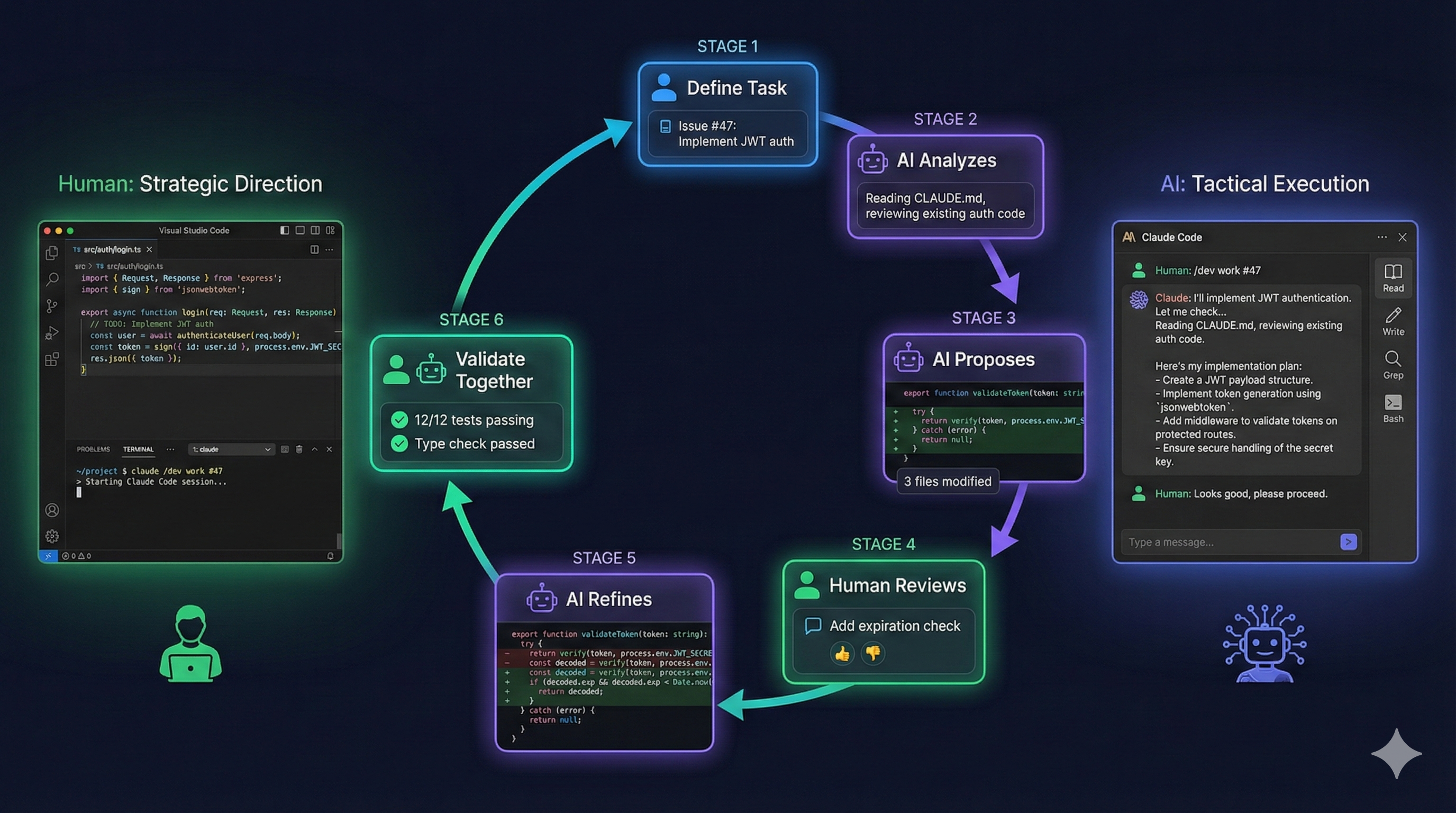
Note that email templates are next."Good AI collaboration is iterative:
You: Request
     ↓
AI:  Attempt
     ↓
You: Review → Feedback
     ↓
AI:  Refinement
     ↓
You: Acceptance or more feedbackBad feedback:
"This isn't right. Fix it."Good feedback:
"The logic is correct, but:
1. Use the existing validateEmail util from src/utils/validation
2. The error message should match our i18n format
3. Add the rate limit check before database query""The authentication flow is correct (1).
However, we need to hash the token before storage,
and the expiry should be 15 minutes, not 1 hour (2).
See src/auth/session.ts:45 for how we handle similar tokens (3)."True pair programming means thinking together, not just delegating:
You as Driver, AI as Navigator:
You: [Writing code]
AI:  "Consider handling the null case on line 15"
You: [Adjusts code]
AI:  "That function already exists in utils/dates.ts"
You: [Uses existing function]
AI as Driver, You as Navigator:
AI:  [Writing code]
You: "Use async/await instead of promises"
AI:  [Adjusts]
You: "Good, but extract that validation to a separate function"
AI: [Refactors]You: "Explain how we should implement rate limiting
for the login endpoint"
AI: [Explains approach: sliding window, Redis, etc.]
You: "Good. Use the simpler token bucket approach since
we don't need precise windows. Implement it."
AI: [Implements with understanding of requirements]By explaining first, the AI demonstrates understanding before writing code.
You: "Create the file structure and function signatures
      for a new user service. Don't implement yet."

AI:  [Creates files with empty functions and types]

You: "Good. Now implement getUserById first."

AI:  [Implements single function]

You: "Now createUser, following the same pattern."
Incrementally building prevents large errors.
AI assistants make excellent first-pass reviewers:
"Review the changes in this file for:
- Logic errors
- Security issues
- Performance concerns
- Code style violations

Don't fix anything yet, just list issues.""Review this authentication code from a security perspective.
Consider:
- Input validation
- Injection vulnerabilities
- Token handling
- Error information leakage""Review how this new feature integrates with our
existing architecture. Check:
- Does it follow our established patterns?
- Are there circular dependencies?
- Should any code be extracted to shared packages?""Analyze this database query code for performance issues.
Consider:
- N+1 query problems
- Missing indexes (check schema in prisma/schema.prisma)
- Unnecessary data fetching
- Caching opportunities"The biggest challenge in AI collaboration is context. Here’s how to manage it:
At the start of each session:
"I'm working on the user authentication refactor for v2.0.
Key files:
- src/services/auth.ts (main service)
- src/routes/auth.ts (API routes)
- prisma/schema.prisma (User model)

Today's goal: Implement magic link authentication.
Related: Issue #48, ADR-007

Let's start."When context seems lost:
"Let me recap where we are:
- We implemented magic link generation (complete)
- We added the email sending (complete)
- We're now working on the verification endpoint
- The token should be validated, then deleted, then session created

Continue with the verification implementation.""Read CLAUDE.md for our coding conventions.
Then implement the user service following those patterns.""Check docs/api/authentication.md for the expected
API contract. Implement to match that specification."For tasks that span multiple sessions:
Session 1:
"Starting auth refactor. Progress in docs/auth-refactor-notes.md"

Session 2:
"Continuing auth refactor. Read docs/auth-refactor-notes.md
for where we left off. Today: email verification flow."

Session 3:
"Final session for auth refactor. Remaining items in
docs/auth-refactor-notes.md. Let's complete the tests."When delegating a task completely:
"Implement the feature described in issue #52.

Follow these constraints:
1. Use existing patterns in src/features/
2. Include unit tests with 80%+ coverage
3. Update the API documentation
4. Create a conventional commit message

Let me know when complete, then I'll review."For complex tasks, break into phases:
"Implement issue #52 in phases:

Phase 1: Database changes
- Add migration for new tables
- Update Prisma schema
- Stop and show me the migration

Phase 2: API implementation
[Wait for Phase 1 approval]

Phase 3: Frontend integration
[Wait for Phase 2 approval]"When you want AI to fill in the details:
"Implement input validation for the user form.

Constraints:
- Use Zod for schemas
- Match the existing validation patterns
- Don't modify the form component structure
- Add error messages to our i18n file

Your choice:
- Exact validation rules
- Error message wording
- Code organization within these files"Wrong:
"Fix the bug."Right:
"Fix the login redirect bug described in issue #47.
The problem is in src/pages/Login.tsx around line 45.
Users are redirected even when authentication fails."Wrong:
"Add a button to the form."
[AI adds button]
"Also style it."
[AI styles]
"Also add hover states."
[Endless additions]
Right:
"Add a submit button to the user form with:
- Primary button style from our design system
- Loading state during submission
- Disabled state when form is invalid
- Proper accessibility attributes"Wrong:
"This doesn't look right."Right:
"The button is correct, but:
- Use 'Submit' not 'Send' to match other forms
- Add mt-4 for spacing above the button
- The disabled check should include form.isValidating"Track these metrics to improve:
In Part 10, we’ll bring everything together in Putting It All Together with PopKit—how workflow orchestration tools can implement all these patterns systematically.
The collaboration patterns in this article are the foundation of PopKit. PopKit’s /popkit:dev command implements a structured 7-phase workflow that guides both you and the AI through discovery, exploration, architecture, implementation, and review—turning ad-hoc prompting into reliable collaboration.
← Part 8: Monorepo Architecture | Part 10: PopKit Orchestration →