Branch Protection & PR Workflows for AI Collaboration
Creating guardrails that protect your codebase while enabling AI contributions
Part 7 of the Agent-Ready Development Series
We’ve set up branch protection, PR templates, and CI pipelines. But there’s a gap: the time between “developer writes code” and “CI catches the problem.”
That gap can be hours. Sometimes days if PRs sit in review.
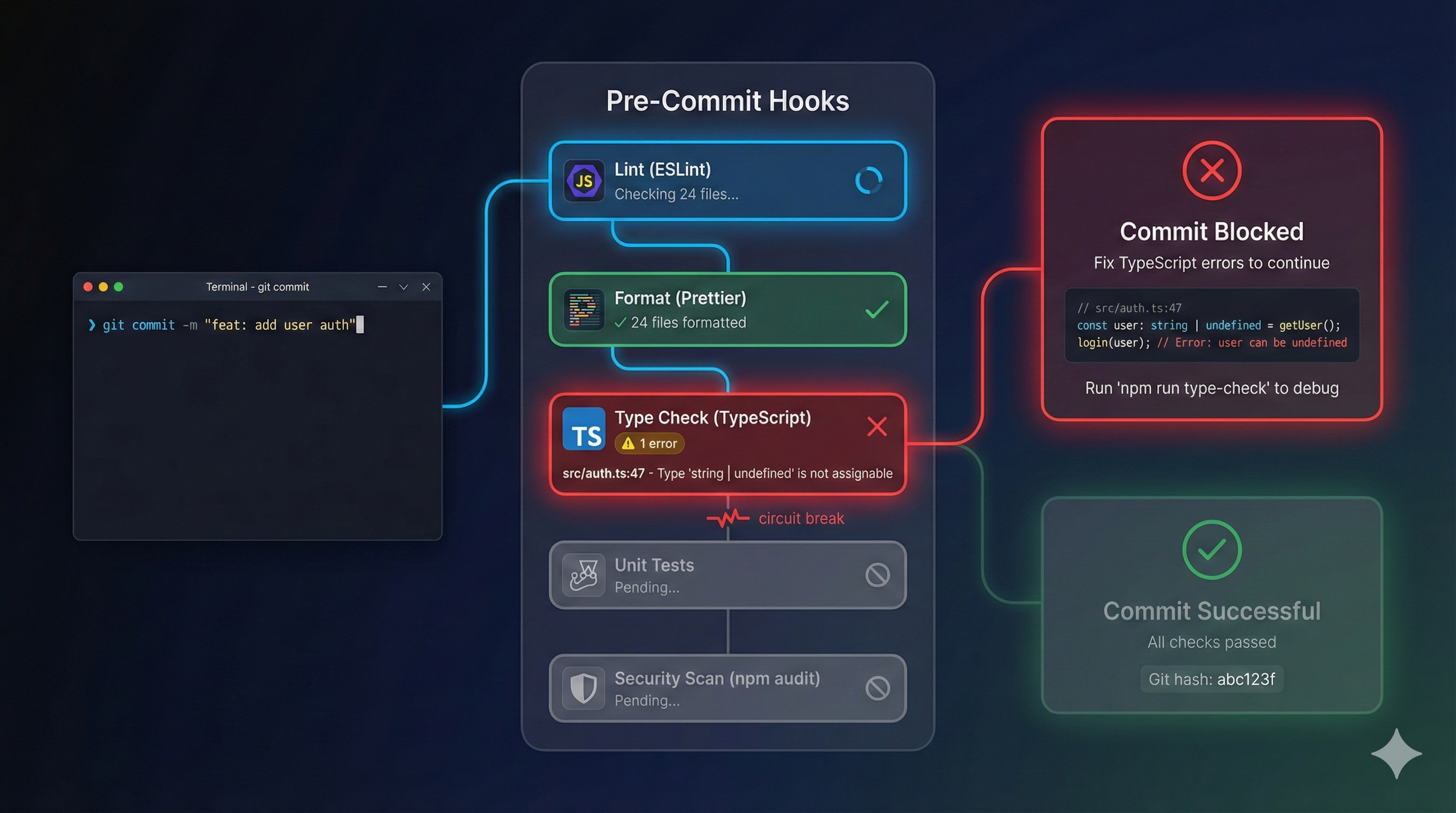
Git hooks close that gap. They catch problems before code leaves the developer’s machine. And for AI assistants, hooks are even more valuable—they provide immediate feedback that shapes better output.
There are two levels of automation:
Run on the developer’s machine before code is shared.
Run on the server after code is pushed.
Both are necessary. Local hooks for speed, remote for thoroughness.
Husky is the de facto standard for managing Git hooks in JavaScript projects:
npm install --save-dev husky lint-staged
npx husky init
This creates:
.husky/
├── _/
│   ├── .gitignore
│   └── husky.sh
└── pre-commit#!/bin/sh
# .husky/pre-commit
. "$(dirname "$0")/_/husky.sh"
npx lint-staged// package.json
{
"lint-staged": {
"*.{ts,tsx}": [
"eslint --fix",
"prettier --write"
],
"*.{json,md,yml}": [
"prettier --write"
],
"*.test.{ts,tsx}": [
"vitest related --run"
]
}
}What this does:
Only staged files are processed—fast even in large codebases.
#!/bin/sh
# .husky/pre-commit

. "$(dirname "$0")/_/husky.sh"

echo "🔍 Running pre-commit checks..."

# Lint and format staged files
npx lint-staged

# Type check (fast, only changed files)
npx tsc --noEmit --incremental

# Check for console.log statements (optional)
if git diff --cached --name-only | xargs grep -l 'console.log' 2>/dev/null; then
  echo "⚠️  Warning: console.log statements detected"
  # Uncomment to make this a blocking error:
  # exit 1
fi

echo "✅ Pre-commit checks passed"#!/bin/sh
# .husky/commit-msg
. "$(dirname "$0")/_/husky.sh"
npx --no -- commitlint --edit "$1"With config:
// commitlint.config.js
module.exports = {
  extends: ['@commitlint/config-conventional'],
  rules: {
    'type-enum': [
      2,
      'always',
      ['feat', 'fix', 'docs', 'style', 'refactor', 'perf', 'test', 'chore', 'ci']
    ],
    'subject-case': [2, 'always', 'lower-case'],
    'header-max-length': [2, 'always', 72]
  }
};#!/bin/sh
# .husky/pre-push
. "$(dirname "$0")/_/husky.sh"
echo "🚀 Running pre-push checks..."
# Full type check
npm run typecheck
# Run tests
npm run test
# Build to catch any build errors
npm run build
echo "✅ Pre-push checks passed"Claude Code supports hooks that intercept AI actions:
Runs before the AI processes your request:
#!/usr/bin/env python3
# .claude/hooks/user-prompt-submit.py

import sys
import json

def main():
    # Read the prompt from stdin
    data = json.load(sys.stdin)
    prompt = data.get('prompt', '')

    # Add project context to every prompt
    context_reminder = """
    Remember:
    - Follow conventions in CLAUDE.md
    - Run tests before committing
    - Use conventional commit format
    """

    # You can modify the prompt or add context
    result = {
        "action": "continue",
        "context": context_reminder
    }

    print(json.dumps(result))

if __name__ == "__main__":
main()Runs before the AI uses a tool (like editing a file):
#!/usr/bin/env python3
# .claude/hooks/pre-tool-use.py

import sys
import json

def main():
    data = json.load(sys.stdin)
    tool = data.get('tool', '')
    params = data.get('params', {})

    # Prevent editing certain files
    protected_files = [
        '.env',
        '.env.production',
        'package-lock.json'
    ]

    if tool == 'edit':
        file_path = params.get('file_path', '')
        for protected in protected_files:
            if file_path.endswith(protected):
                result = {
                    "action": "block",
                    "message": f"Cannot edit {protected} - this file is protected"
                }
                print(json.dumps(result))
                return

    # Allow the action
    result = {"action": "continue"}
    print(json.dumps(result))

if __name__ == "__main__":
main()Runs after the AI completes an action:
#!/usr/bin/env python3
# .claude/hooks/post-tool-use.py

import sys
import json
import subprocess

def main():
    data = json.load(sys.stdin)
    tool = data.get('tool', '')
    params = data.get('params', {})

    # After editing TypeScript files, run type check
    if tool == 'edit':
        file_path = params.get('file_path', '')
        if file_path.endswith('.ts') or file_path.endswith('.tsx'):
            result = subprocess.run(
                ['npx', 'tsc', '--noEmit', file_path],
                capture_output=True,
                text=True
            )
            if result.returncode != 0:
                feedback = {
                    "action": "feedback",
                    "message": f"Type error in edited file:\n{result.stderr}"
                }
                print(json.dumps(feedback))
                return

    result = {"action": "continue"}
    print(json.dumps(result))

if __name__ == "__main__":
main()Beyond hooks, your CI pipeline should have layers:
# .github/workflows/ci.yml
lint:
  runs-on: ubuntu-latest
  steps:
    - uses: actions/checkout@v4
    - uses: actions/setup-node@v4
      with:
        node-version: '20'
        cache: 'npm'
    - run: npm ci
    - run: npm run lint
- run: npm run typechecktest:
runs-on: ubuntu-latest
needs: lint
steps:
- uses: actions/checkout@v4
- uses: actions/setup-node@v4
with:
node-version: '20'
cache: 'npm'
- run: npm ci
- run: npm run test:unitintegration:
runs-on: ubuntu-latest
needs: test
services:
postgres:
image: postgres:15
env:
POSTGRES_PASSWORD: test
options: >-
--health-cmd pg_isready
--health-interval 10s
--health-timeout 5s
--health-retries 5
steps:
- uses: actions/checkout@v4
- uses: actions/setup-node@v4
with:
node-version: '20'
cache: 'npm'
- run: npm ci
- run: npm run test:integration
env:
DATABASE_URL: postgresql://postgres:test@localhost:5432/teste2e:
runs-on: ubuntu-latest
needs: integration
if: github.ref == 'refs/heads/main' # Only on main branch
steps:
- uses: actions/checkout@v4
- uses: actions/setup-node@v4
with:
node-version: '20'
cache: 'npm'
- run: npm ci
- run: npx playwright install --with-deps
- run: npm run test:e2eLocal hooks:
- Lint (< 5s)
- Format (< 2s)
- Type check (< 10s)
- Unit tests for changed files (< 10s)
Total: < 30 seconds
Remote CI:
- Full lint
- Full type check
- All unit tests
- Integration tests
- E2E tests
- Security scans
- Build verification
Total: 5-15 minutes# Skip pre-commit hooks (use sparingly!)
git commit --no-verify -m "hotfix: emergency production fix"Document when this is acceptable (never for regular development).
# .github/workflows/ci.yml
- uses: actions/cache@v4
  with:
    path: |
      ~/.npm
      node_modules
      .turbo
    key: ${{ runner.os }}-modules-${{ hashFiles('**/package-lock.json') }}
    restore-keys: |
${{ runner.os }}-modules-jobs:
lint:
runs-on: ubuntu-latest
steps:
- run: npm run lint
continue-on-error: false # Stop immediately on failurejobs:
lint:
runs-on: ubuntu-latest
# No dependencies - runs immediately
typecheck:
runs-on: ubuntu-latest
# No dependencies - runs in parallel with lint
test:
runs-on: ubuntu-latest
needs: [lint, typecheck] # Waits for bothWhen an AI assistant triggers a hook failure, it gets immediate feedback:
$ git commit -m "add user feature"

🔍 Running pre-commit checks...

✖ eslint found 2 errors:
  src/user.ts:15:5 - 'userId' is defined but never used
  src/user.ts:23:10 - Unexpected console.log statement

❌ Pre-commit checks failed

AI Assistant: I see the pre-commit checks failed. Let me fix these issues:
1. Removing unused 'userId' variable
2. Removing console.log statement

[Makes corrections]

$ git commit -m "add user feature"

🔍 Running pre-commit checks...
✅ Pre-commit checks passed
[main abc123] add user feature
The hook provides:
The AI corrects and tries again. This loop happens in seconds, not hours.
Track how often hooks catch issues:
# .github/workflows/hook-metrics.yml
name: Hook Metrics

on:
  push:
    branches: [main]

jobs:
  collect:
    runs-on: ubuntu-latest
    steps:
      - uses: actions/checkout@v4
        with:
          fetch-depth: 100

      - name: Count commits with no-verify
        run: |
          count=$(git log --oneline -100 | grep -c "no-verify\|--no-v" || true)
          echo "no_verify_commits=$count" >> $GITHUB_OUTPUT

      - name: Report
        if: steps.collect.outputs.no_verify_commits > 5
        run: |
echo "⚠️ High number of --no-verify commits detected"npm install --save-dev husky && npx husky initecho "npx eslint ." > .husky/pre-commitIn Part 8, we’ll explore Monorepos & Multi-Project Architecture—scaling agent-ready practices across large, complex codebases with multiple applications and shared code.
Hook management is deeply integrated into PopKit. PopKit’s hook system provides sophisticated context injection, tool filtering, and quality gates specifically designed for AI-assisted development. The /popkit:dev workflow automatically ensures your changes pass all configured hooks before creating PRs.
← Part 6: Documentation as Context | Part 8: Monorepo Architecture →