Foundation Files That Agents Actually Read
README.md, CLAUDE.md, CONTRIBUTING.md—and why each one serves a different purpose
Part 6 of the Agent-Ready Development Series
We all know we should write documentation. We rarely do it well.
Here’s why: documentation that’s written “for reference” gets stale. Nobody updates it. Eventually, it becomes a liability—actively misleading anyone who trusts it.
But documentation written as context for AI assistants has to stay current. If it’s wrong, the AI makes mistakes. You notice immediately. You fix it.
This creates a virtuous cycle: documentation that serves AI stays accurate enough to serve humans too.
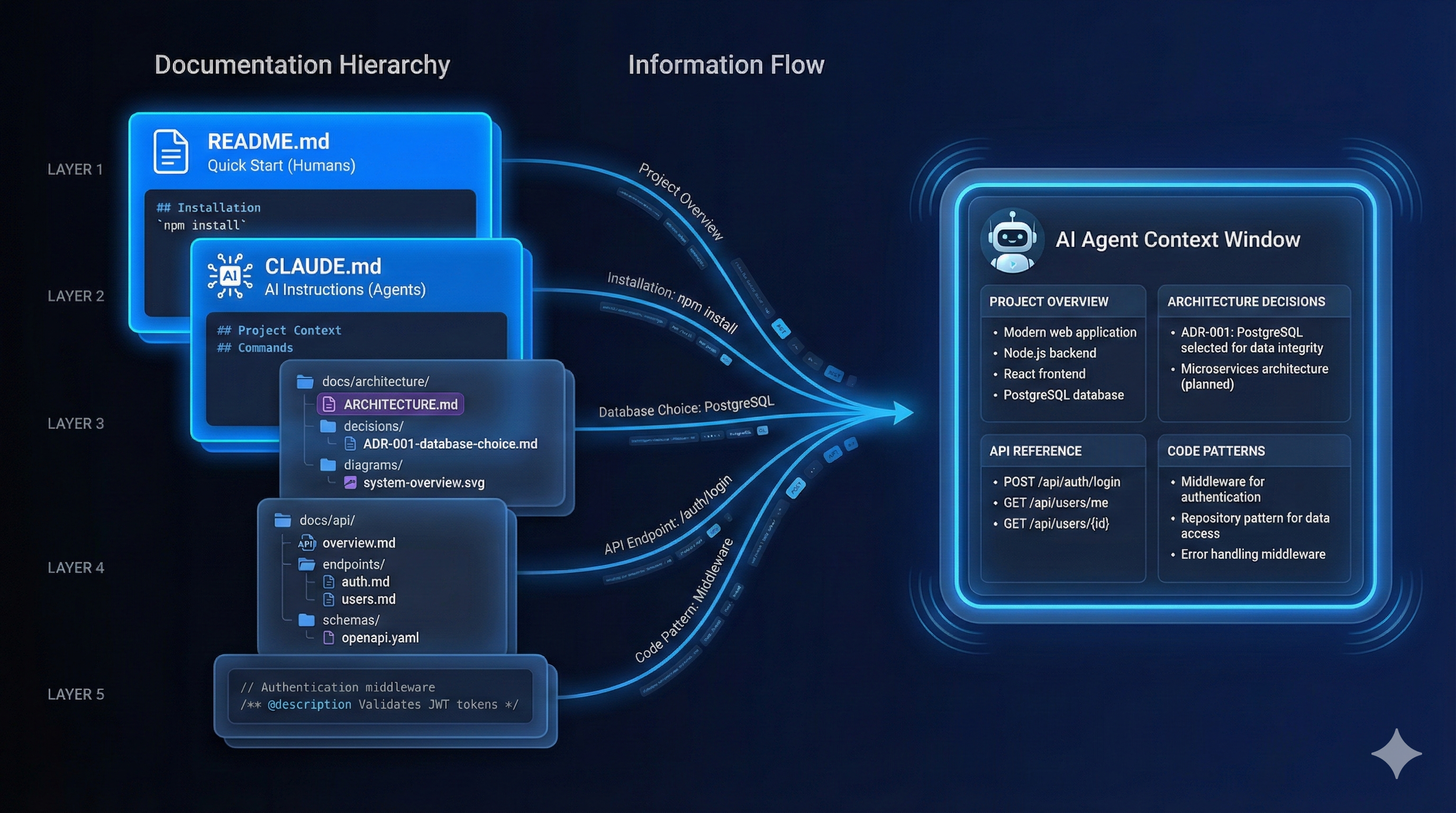
Not all documentation is equal. Here’s how different types serve different purposes:
docs/
├── README.md                    # Quick start (humans)
├── CLAUDE.md                    # AI instructions (agents)
├── ARCHITECTURE.md              # System overview (both)
├── architecture/
│   ├── decisions/              # ADRs (both)
│   └── diagrams/               # Visual aids (humans)
├── guides/
│   ├── getting-started.md      # Onboarding (humans)
│   ├── deployment.md           # Runbook (both)
│   └── troubleshooting.md      # Problem solving (both)
├── api/
│   ├── overview.md             # API concepts (both)
│   └── endpoints/              # Reference (agents)
└── internal/
    ├── conventions.md          # Code style (agents)
└── patterns.md # Reusable patterns (both)The most valuable documentation for AI assistants is architecture documentation. It explains the “why” behind the “what.”
# System Architecture

## Overview

One paragraph describing what the system does at a high level.

## Core Components

### Frontend (React SPA)
- **Location**: `src/frontend/`
- **Purpose**: User-facing web application
- **Key Libraries**: React 18, React Query, Zustand
- **Entry Point**: `src/frontend/main.tsx`

### API Server (Express)
- **Location**: `src/api/`
- **Purpose**: REST API handling business logic
- **Key Libraries**: Express 4, Prisma, Zod
- **Entry Point**: `src/api/server.ts`

### Background Workers (BullMQ)
- **Location**: `src/workers/`
- **Purpose**: Async job processing
- **Key Libraries**: BullMQ, Redis
- **Entry Point**: `src/workers/index.ts`

## Data Flow

    User → Frontend → API → Database
                        ↓
                    Workers → External Services

## Key Patterns

### Authentication Flow
1. User submits credentials
2. API validates against database
3. JWT issued with 15-min expiry
4. Refresh token stored in HTTP-only cookie
5. Frontend includes JWT in Authorization header

### Error Handling
- All errors extend BaseError class
- API returns consistent error format
- Frontend displays user-friendly messages
- Errors logged to monitoring service

## External Dependencies

| Service | Purpose | Fallback |
|---------|---------|----------|
| PostgreSQL | Primary database | None (required) |
| Redis | Caching, job queue | In-memory fallback |
| SendGrid | Email delivery | Log to console |
| Stripe | Payments | Test mode |

## Configuration

Environment-based configuration in `src/config/`:
- Development: `.env.development`
- Production: `.env.production`
- Testing: `.env.test`

All config validated at startup via Zod schemas.

## Security Considerations

- All inputs validated server-side
- SQL injection prevented via Prisma
- XSS prevented via React's default escaping
- CSRF tokens required for state-changing requests
- Rate limiting on authentication endpointsWhen Claude needs to add a new feature, this document tells it:
No guessing. No asking.
ADRs capture the “why” behind significant technical decisions. They’re invaluable for AI assistants trying to understand constraints.
# ADR-001: Use JWT for Authentication

## Status

Accepted (2025-01-15)

## Context

We need to implement authentication for our API. Options considered:
- Session-based authentication
- JWT tokens
- OAuth 2.0 with external provider

## Decision

We will use JWT tokens with short expiry (15 min) and refresh tokens.

## Rationale

1. **Stateless**: JWT allows horizontal scaling without session sync
2. **Mobile-friendly**: Works well with mobile apps we're planning
3. **Microservices-ready**: Tokens can be validated by any service
4. **Control**: We maintain full control over auth flow

We rejected sessions because they require sticky sessions or shared storage.
We rejected OAuth-only because we need email/password for some users.

## Consequences

**Positive:**
- Simpler scaling architecture
- Better developer experience for API consumers
- Easier testing (just include token)

**Negative:**
- Token revocation requires blocklist or short expiry
- Larger request headers
- JWT libraries need security updates

## Implementation

- JWT library: `jose` (actively maintained, TypeScript)
- Refresh tokens stored in database
- Access tokens in memory only
- See `src/api/auth/` for implementation

## References

- Related ADRs: ADR-002 (Token Refresh Strategy)
- Implementation: `src/api/auth/jwt.ts`
- Tests: `src/api/auth/__tests__/`# Architecture Decision Records
| ADR | Title | Status | Date |
|-----|-------|--------|------|
| [001](./001-jwt-authentication.md) | Use JWT for Authentication | Accepted | 2025-01-15 |
| [002](./002-refresh-token-strategy.md) | Token Refresh Strategy | Accepted | 2025-01-16 |
| [003](./003-database-choice.md) | PostgreSQL as Primary DB | Accepted | 2025-01-10 |
| [004](./004-job-queue.md) | BullMQ for Background Jobs | Accepted | 2025-01-20 |
| [005](./005-frontend-state.md) | Zustand for Client State | Proposed | 2025-02-01 |When an AI encounters code it doesn’t understand, ADRs explain the reasoning.
API documentation serves both humans (understanding) and AI (implementation).
The gold standard for API documentation:
# openapi.yaml
openapi: 3.0.3
info:
  title: MyApp API
  version: 2.0.0
  description: Backend API for MyApp

servers:
  - url: https://api.myapp.com/v2
    description: Production
  - url: http://localhost:3000/v2
    description: Development

paths:
  /users:
    get:
      summary: List all users
      tags: [Users]
      security:
        - bearerAuth: []
      parameters:
        - name: page
          in: query
          schema:
            type: integer
            default: 1
        - name: limit
          in: query
          schema:
            type: integer
            default: 20
            maximum: 100
      responses:
        '200':
          description: List of users
          content:
            application/json:
              schema:
                $ref: '#/components/schemas/UserList'
        '401':
          $ref: '#/components/responses/Unauthorized'

    post:
      summary: Create a new user
      tags: [Users]
      requestBody:
        required: true
        content:
          application/json:
            schema:
              $ref: '#/components/schemas/CreateUser'
      responses:
        '201':
          description: User created
          content:
            application/json:
              schema:
                $ref: '#/components/schemas/User'

components:
  schemas:
    User:
      type: object
      properties:
        id:
          type: string
          format: uuid
        email:
          type: string
          format: email
        name:
          type: string
        createdAt:
          type: string
          format: date-time
      required: [id, email, name, createdAt]

    CreateUser:
      type: object
      properties:
        email:
          type: string
          format: email
        name:
          type: string
          minLength: 2
          maxLength: 100
        password:
          type: string
          minLength: 8
      required: [email, name, password]

  securitySchemes:
    bearerAuth:
      type: http
      scheme: bearer
      bearerFormat: JWT
AI assistants can read OpenAPI specs and:
When things go wrong, runbooks guide both humans and AI through recovery.
# Deployment Runbook

## Pre-Deployment Checklist

- [ ] All tests passing
- [ ] Staging deployment verified
- [ ] Database migrations tested
- [ ] Rollback plan documented
- [ ] Team notified in #deployments

## Deployment Steps

### 1. Pre-flight

    # Check current version
    kubectl get deployment api -o jsonpath='{.spec.template.spec.containers[0].image}'

    # Verify staging health
    curl https://staging.myapp.com/health

### 2. Deploy

    # Deploy new version
    kubectl set image deployment/api api=myapp/api:v2.1.0

    # Watch rollout
    kubectl rollout status deployment/api

### 3. Verify

    # Check health endpoint
    curl https://api.myapp.com/health

    # Check key functionality
    curl https://api.myapp.com/v2/users -H "Authorization: Bearer $TOKEN"

## Rollback

If issues are detected:

    # Immediate rollback
    kubectl rollout undo deployment/api

    # Verify rollback
    kubectl rollout status deployment/api

## Common Issues

### Database Connection Errors

**Symptoms**: 500 errors, "Connection refused" in logs

**Diagnosis**:

    kubectl logs deployment/api | grep -i database

**Resolution**:
1. Check database is running: `kubectl get pods -l app=postgres`
2. Check connection string: `kubectl get secret db-credentials -o yaml`
3. Restart API pods: `kubectl rollout restart deployment/api`

### High Memory Usage

**Symptoms**: OOMKilled pods, slow responses

**Diagnosis**:

    kubectl top pods

**Resolution**:
1. Check for memory leaks in recent changes
2. Increase memory limits temporarily
3. Scale horizontally: `kubectl scale deployment/api --replicas=4`Document reusable patterns so AI can apply them consistently:
# Code Patterns

## Service Pattern

All business logic lives in services. Services are:
- Pure functions where possible
- Dependency-injected for testing
- Located in `src/services/`

### Template

    // src/services/user.service.ts
    import { db } from '../db';
    import { CreateUserInput, User } from '../types';

    export const userService = {
      async create(input: CreateUserInput): Promise<User> {
        const validated = createUserSchema.parse(input);
        return db.user.create({ data: validated });
      },

      async findById(id: string): Promise<User | null> {
        return db.user.findUnique({ where: { id } });
      },
    };

## Error Handling Pattern

All errors use a consistent structure:

    // src/errors/base.ts
    export class AppError extends Error {
      constructor(
        message: string,
        public code: string,
        public statusCode: number = 500,
        public details?: Record<string, unknown>
      ) {
        super(message);
        this.name = 'AppError';
      }
    }

    // Usage
    throw new AppError(
      'User not found',
      'USER_NOT_FOUND',
      404
    );

## Testing Pattern

Tests mirror source structure:

    src/
    ├── services/
    │   ├── user.service.ts
    │   └── user.service.test.ts  ← Adjacent

Test structure:

    describe('UserService', () => {
      describe('create', () => {
        it('should create user with valid input', async () => {
          // Arrange
          const input = { email: 'test@example.com', name: 'Test' };

          // Act
          const user = await userService.create(input);

          // Assert
          expect(user.email).toBe(input.email);
        });

        it('should reject invalid email', async () => {
          const input = { email: 'invalid', name: 'Test' };
          await expect(userService.create(input)).rejects.toThrow();
        });
      });
});Documentation rots. Here’s how to prevent it:
Add to PR template:
## Documentation

- [ ] README updated (if applicable)
- [ ] CLAUDE.md updated (if conventions changed)
- [ ] API docs updated (if endpoints changed)
- [ ] ADR created (if significant decision made)# .github/workflows/docs.yml
name: Documentation
on:
pull_request:
paths:
- 'docs/**'
- 'openapi.yaml'
- '**.md'
jobs:
validate:
runs-on: ubuntu-latest
steps:
- uses: actions/checkout@v4
# Validate OpenAPI
- run: npx @redocly/cli lint openapi.yaml
# Check for broken links
- uses: gaurav-nelson/github-action-markdown-link-check@v1
with:
use-quiet-mode: 'yes'
# Validate markdown structure
- run: npx markdownlint-cli docs/**/*.mdAdd dates to documents:
---
last_updated: 2025-02-15
review_by: 2025-05-15
owner: @alice
---

# Architecture Documentation

...docs/ARCHITECTURE.md with component overviewIn Part 7, we’ll explore Git Hooks & Automation Pipelines—programmatic quality gates that catch issues before they become problems, and how to create hooks that help rather than hinder.
Documentation management is a core strength of PopKit. The /popkit:project analyze command scans your codebase and generates documentation suggestions. PopKit’s agents can also generate ADRs when you make significant technical decisions, ensuring your architectural context is always current.
← Part 5: Milestones & Projects | Part 7: Hooks & Automation →