Issue Templates That Guide AI Assistants
Structured issues that give agents the context they need to actually help
Part 5 of the Agent-Ready Development Series
An AI assistant working on issue #47 knows everything about that issue. But does it know:
Without the big picture, AI assistants make locally optimal decisions that might be globally suboptimal. They implement features that conflict with upcoming changes. They optimize code that’s scheduled for deletion. They solve problems that are already solved elsewhere.
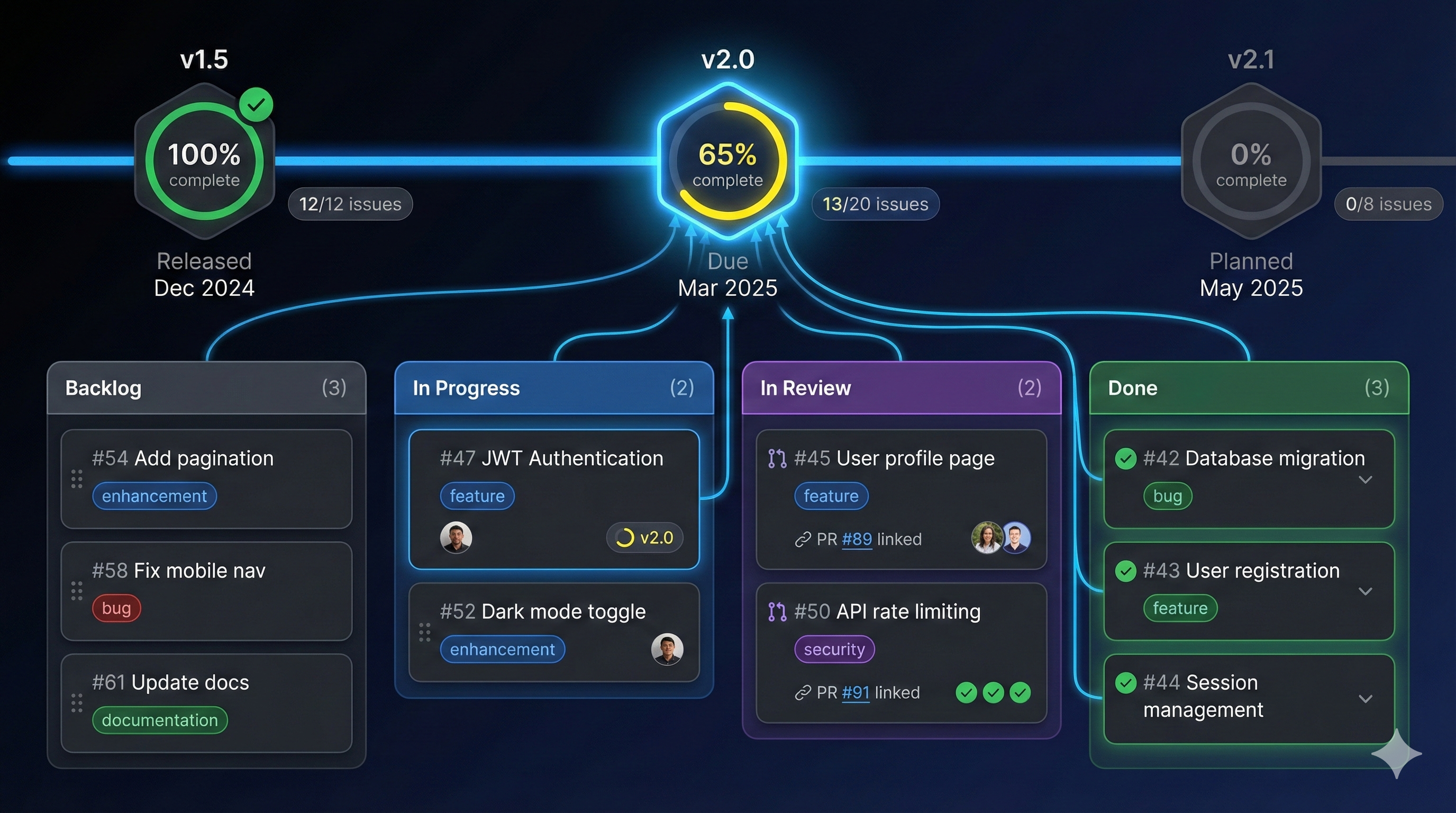
Milestones and project boards give AI assistants the context to make smart decisions.
A milestone is a deadline with a purpose. It groups related issues toward a common goal.
Milestone: v2.0 - User Authentication Overhaul
Due Date: March 15, 2025

Description:
Complete reimplementation of authentication system. Moving from
session-based auth to JWT with refresh tokens. Includes SSO
integration, passwordless login, and 2FA support.

Success Criteria:
- All existing users can still log in
- Session migration completed
- SSO works with Google and Microsoft
- 2FA enrollment available
- No increase in auth-related support tickets

Related Documentation:
- docs/architecture/auth-v2.md
- docs/migration/auth-migration-plan.mdQ1 2025 Release (Parent)
├── v2.0 - Authentication Overhaul
│ ├── #45 - JWT implementation
│ ├── #46 - Refresh token logic
│ ├── #47 - SSO integration
│ └── #48 - 2FA support
├── v2.1 - Dashboard Redesign
│ ├── #51 - New layout system
│ ├── #52 - Widget framework
│ └── #53 - Data visualization upgrade
└── v2.2 - Performance Improvements
├── #61 - Database query optimization
├── #62 - Frontend bundle splitting
└── #63 - CDN configurationWhen Claude works on issue #47 (SSO integration), it understands:
This context shapes implementation decisions.
GitHub Projects (the new version) provides powerful board-based project management.
Columns:
📥 Backlog      → Ideas and future work
🔍 Triage       → Needs assessment
📋 Ready        → Ready for development
🔧 In Progress  → Currently being worked on
👀 Review       → In PR review
✅ Done → Completed this cycleAdd fields to capture important metadata:
| Field | Type | Options |
|---|---|---|
| Priority | Single Select | Critical, High, Medium, Low |
| Size | Single Select | XS, S, M, L, XL |
| Sprint | Iteration | Week 1, Week 2, Week 3… |
| Area | Single Select | Auth, API, UI, Infra |
| Assignee | People | Team members |
| Milestone | Milestone | v2.0, v2.1, v2.2 |
Board View: Current sprint work
📥 Backlog → 📋 Ready → 🔧 In Progress → 👀 Review → ✅ DoneTable View: All issues with metadata
| Issue | Priority | Size | Sprint | Assignee | Status |
|-------|----------|------|--------|----------|--------|
| #45   | High     | L    | Week 1 | @alice   | Done   |
| #46   | High     | M    | Week 2 | @bob     | Review |
| #47   | Medium   | L    | Week 2 | @claude  | WIP    |
Roadmap View: Timeline perspective
Jan 2025        Feb 2025        Mar 2025
|---- v2.0 Auth Overhaul -------|
                |---- v2.1 Dashboard ----|
|---- v2.2 Perf ----|Here’s how high-level organization flows down to individual work:
Quarterly Goal: "Reduce user friction in onboarding"
    │
    ├── Milestone: v2.0 - Authentication Overhaul
    │       │
    │       ├── Epic #40: Passwordless Login
    │       │       │
    │       │       ├── Issue #41: Magic link generation
    │       │       ├── Issue #42: Email delivery integration
    │       │       └── Issue #43: Verification flow UI
    │       │
    │       └── Epic #50: SSO Integration
    │               │
    │               ├── Issue #51: OAuth provider setup
    │               └── Issue #52: Account linking logic
    │
    └── Milestone: v2.1 - Onboarding Flow
            │
            └── Epic #60: Guided Setup
                    │
                    ├── Issue #61: Welcome wizard
                    └── Issue #62: Progress indicators
Every issue exists within a context of:
## Context

**Milestone**: v2.0 - Authentication Overhaul
**Epic**: #40 - Passwordless Login
**Sprint**: Week 2 of 4

## Dependencies

**Blocked by**:
- #41 - Magic link generation (in progress)

**Blocks**:
- #44 - Email template updates
- #60 - Onboarding wizard integration

**Related**:
- #35 - Previous email system refactor## Related Issues
Closes #43
## Milestone Progress
This PR completes 3/4 issues for the Passwordless Login epic:
- [x] #41 - Magic link generation
- [x] #42 - Email delivery integration
- [x] #43 - Verification flow UI ← This PR
- [ ] #44 - Email template updates (next)
After this PR, v2.0 milestone is 60% complete.feat(auth): implement magic link verification flow (#43)
Completes the passwordless login epic (#40) UI component.
Part of v2.0 Authentication Overhaul milestone.When you organize work into sprints, AI assistants can help prioritize:
Sprint 3 Planning (Feb 5-19)

Velocity: ~13 story points based on last 2 sprints

Committed Work:
┌─────────────────────────────────────────┬────────┐
│ Issue                                   │ Points │
├─────────────────────────────────────────┼────────┤
│ #47 - SSO integration (Microsoft)       │ 5      │
│ #48 - 2FA enrollment UI                 │ 3      │
│ #49 - Session migration script          │ 3      │
│ #63 - CDN configuration                 │ 2      │
└─────────────────────────────────────────┴────────┤
                                    Total │ 13     │
                                          └────────┘

Stretch Goals (if time permits):
- #64 - Cache warming strategy (2 pts)
- #65 - Error monitoring setup (2 pts)

Blocked/Deferred:
- #50 - Google SSO (waiting on business approval)
AI assistants can now:
Track milestone progress explicitly:
# v2.0 Authentication Overhaul - Status

**Target Date**: March 15, 2025
**Current Date**: February 10, 2025
**Days Remaining**: 33

## Progress

| Epic | Done | Total | Status |
|------|------|-------|--------|
| JWT Implementation | 3 | 3 | ✅ Complete |
| Passwordless Login | 3 | 4 | 🔄 75% |
| SSO Integration | 1 | 3 | 🔄 33% |
| 2FA Support | 0 | 4 | ⏳ Not started |

**Overall**: 7/14 issues (50%)

## Risk Assessment

🟢 JWT: Complete and tested
🟡 Passwordless: On track, needs email templates
🔴 SSO: Blocked on Google approval
🟡 2FA: Not started, needs to begin by Feb 15

## Decisions Needed

- [ ] Proceed without Google SSO if approval delayed?
- [ ] 2FA optional for v2.0, required for v2.1?Automate board updates to reduce manual work:
# .github/workflows/project-automation.yml
name: Project Automation

on:
  issues:
    types: [opened, closed, labeled, unlabeled]
  pull_request:
    types: [opened, closed, ready_for_review, review_requested]

jobs:
  update-project:
    runs-on: ubuntu-latest
    steps:
      - uses: actions/add-to-project@v0.5.0
        with:
          project-url: https://github.com/users/YOU/projects/1
          github-token: ${{ secrets.PROJECT_TOKEN }}

  move-on-pr:
    runs-on: ubuntu-latest
    if: github.event.pull_request
    steps:
      - name: Move to Review
        if: github.event.action == 'ready_for_review'
        uses: leonsteinhaeuser/project-beta-automations@v2
        with:
          project_id: 1
          resource_node_id: ${{ github.event.pull_request.node_id }}
          status_value: "Review"

  move-on-close:
    runs-on: ubuntu-latest
    if: github.event.issue.state == 'closed'
    steps:
      - name: Move to Done
        uses: leonsteinhaeuser/project-beta-automations@v2
        with:
          project_id: 1
          resource_node_id: ${{ github.event.issue.node_id }}
status_value: "Done"# .github/workflows/auto-priority.yml
name: Auto Priority
on:
issues:
types: [labeled]
jobs:
set-priority:
runs-on: ubuntu-latest
steps:
- uses: leonsteinhaeuser/project-beta-automations@v2
if: contains(github.event.label.name, 'priority-critical')
with:
project_id: 1
resource_node_id: ${{ github.event.issue.node_id }}
priority_value: "Critical"A sustainable development rhythm looks like:
AI assistants benefit from this rhythm because:
In Part 6, we’ll explore Documentation as Executable Context—making your docs do double duty as AI context and human reference, with patterns for documentation that actually gets used.
Milestone and project management is central to PopKit. The /popkit:milestone command provides health analysis of your milestones, identifying at-risk deadlines and blocked work. Combined with /popkit:next, it intelligently recommends what to work on based on priority, dependencies, and deadline pressure.
← Part 4: Issue Templates | Part 6: Documentation as Context →