Milestones & Project Boards: The Big Picture
How high-level organization helps agents understand where individual tasks fit
Part 4 of the Agent-Ready Development Series
I used to create issues like this:
Title: Login broken
Body: Users can't login. Please fix.
Then I’d wonder why AI assistants (and teammates) kept asking clarifying questions.
The issue contains almost no actionable information:
Garbage in, garbage out. If your issues are vague, your AI assistant’s attempts to solve them will be too.
Think of an issue as a contract. It specifies:
When issues contain this information, AI assistants can:
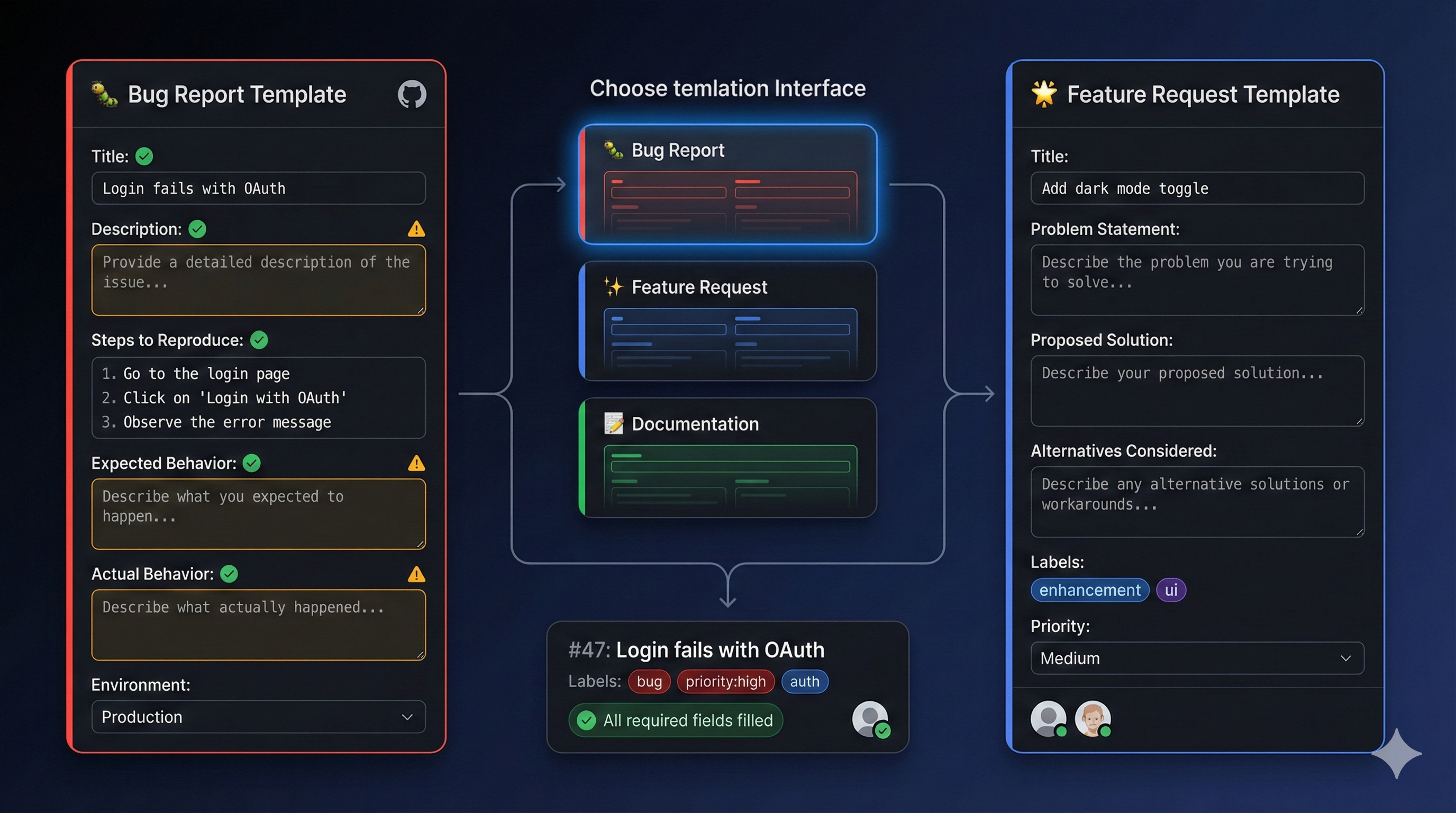
GitHub supports multiple issue templates. Here’s the structure I use:
.github/
└── ISSUE_TEMPLATE/
    ├── bug_report.md
    ├── feature_request.md
    ├── technical_debt.md
    ├── documentation.md
    └── config.yml
Let’s build each one.
<!-- .github/ISSUE_TEMPLATE/bug_report.md -->
---
name: Bug Report
about: Report a bug to help us improve
title: '[BUG] '
labels: 'bug, needs-triage'
assignees: ''
---

## Bug Description

<!-- A clear, concise description of the bug -->

## Steps to Reproduce

1. Go to '...'
2. Click on '...'
3. Scroll down to '...'
4. See error

## Expected Behavior

<!-- What should happen? -->

## Actual Behavior

<!-- What actually happens? -->

## Environment

- **Browser/Device**: <!-- e.g., Chrome 120, iPhone 15 -->
- **OS**: <!-- e.g., Windows 11, macOS Sonoma -->
- **App Version**: <!-- e.g., v2.1.0, commit abc123 -->
- **User Role**: <!-- e.g., Admin, Free User, Guest -->

## Error Messages

<!-- Copy paste any error messages, stack traces, or console output -->
Paste error here
## Screenshots/Videos

<!-- If applicable, add visual evidence -->

## Additional Context

<!-- Any other relevant information -->
- Did this work before? When?
- Does it happen consistently or intermittently?
- Any workarounds found?

## Possible Cause (Optional)

<!-- If you have ideas about what might be causing this -->

---

**Priority Assessment** (for triagers):
- [ ] Blocking production use
- [ ] Affects many users
- [ ] Has workaround
- [ ] Edge caseEvery field gives the AI (or developer) specific, actionable information:
| Field | What It Tells AI |
|---|---|
| Steps to Reproduce | Exact sequence to recreate the bug |
| Expected vs Actual | What “fixed” looks like |
| Environment | Where to test the fix |
| Error Messages | Likely location of the bug |
| Possible Cause | Starting point for investigation |
<!-- .github/ISSUE_TEMPLATE/feature_request.md -->
---
name: Feature Request
about: Suggest a new feature or enhancement
title: '[FEATURE] '
labels: 'enhancement, needs-triage'
assignees: ''
---

## Problem Statement

<!-- What problem does this feature solve? -->
As a [type of user], I want [goal] so that [benefit].

## Proposed Solution

<!-- How should this work? -->

### User Experience

<!-- Describe the user flow -->
1. User navigates to...
2. User clicks...
3. System displays...

### Acceptance Criteria

<!-- Specific, testable criteria -->
- [ ] Criterion 1
- [ ] Criterion 2
- [ ] Criterion 3

## Alternatives Considered

<!-- What other approaches were considered? -->

## Technical Considerations

<!-- Any known technical constraints or dependencies? -->
- Requires: <!-- APIs, services, packages -->
- Affected areas: <!-- files, components, systems -->
- Breaking changes: <!-- yes/no, explain -->

## Design Resources (Optional)

<!-- Mockups, wireframes, or design specs -->

## Priority & Scope

**Business Value**: <!-- Low / Medium / High / Critical -->
**Effort Estimate**: <!-- Small / Medium / Large / XL -->
**Target Release**: <!-- e.g., v2.2, Q1 2025 -->

## Related

<!-- Link to related issues, discussions, or docs -->
- Related to #
- Blocks #
- Blocked by #

---

**Implementation Notes** (for developers):
<!-- Technical guidance or suggestions -->When you tell Claude: “Implement the feature in issue #52”
It can immediately understand:
No back-and-forth required.
<!-- .github/ISSUE_TEMPLATE/technical_debt.md -->
---
name: Technical Debt
about: Track code quality improvements and refactoring
title: '[TECH DEBT] '
labels: 'tech-debt, maintenance'
assignees: ''
---

## Current State

<!-- What's the current problematic situation? -->

## Problems It Causes

<!-- Why is this debt causing issues? -->
- [ ] Performance impact
- [ ] Developer experience
- [ ] Maintainability
- [ ] Security risk
- [ ] Scaling limitation

## Proposed Improvement

<!-- What should the code look like? -->

## Files/Areas Affected

<!-- Specific locations -->
- `src/path/to/file.ts`
- `src/path/to/other/`

## Effort Required

- **Size**: <!-- Small / Medium / Large -->
- **Risk**: <!-- Low / Medium / High -->
- **Testing**: <!-- What tests need updating? -->

## Blockers

<!-- What else needs to happen first? -->
- Blocked by #
- Requires discussion on #

## Definition of Done

- [ ] Code refactored
- [ ] Tests updated/passing
- [ ] No regression in functionality
- [ ] Documentation updated<!-- .github/ISSUE_TEMPLATE/documentation.md -->
---
name: Documentation
about: Request or propose documentation changes
title: '[DOCS] '
labels: 'documentation'
assignees: ''
---
## Documentation Type
- [ ] New documentation
- [ ] Update existing docs
- [ ] Fix incorrect docs
- [ ] Improve clarity
## What Needs Documenting
<!-- Describe what's missing or needs improvement -->
## Location
<!-- Where should this documentation live? -->
- [ ] README.md
- [ ] CLAUDE.md
- [ ] docs/ folder
- [ ] Code comments
- [ ] Other:
## Proposed Content
<!-- Draft or outline of the documentation -->
## Related Code
<!-- Link to relevant code if documenting a feature -->
## Audience
<!-- Who is this documentation for? -->
- [ ] New developers
- [ ] End users
- [ ] API consumers
- [ ] AI assistants# .github/ISSUE_TEMPLATE/config.yml
blank_issues_enabled: false
contact_links:
- name: Questions & Discussions
url: https://github.com/user/repo/discussions
about: Ask questions and get help from the community
- name: Security Vulnerabilities
url: https://github.com/user/repo/security/advisories/new
about: Report security issues privatelySetting blank_issues_enabled: false forces users to pick a template—no more vague one-liner issues.
Issues need labels for filtering and prioritization:
# Suggested label set

# Type
bug           # Something isn't working
enhancement   # New feature or improvement
tech-debt     # Code quality improvement
documentation # Documentation changes
question      # Question needing answer

# Status
needs-triage  # Needs initial assessment
in-progress   # Currently being worked on
blocked       # Waiting on something
ready         # Ready for development

# Priority
priority-critical  # Production down
priority-high      # Major impact
priority-medium    # Normal priority
priority-low       # Nice to have

# Area (customize for your project)
area-auth     # Authentication/authorization
area-api      # API endpoints
area-ui       # User interface
area-db       # Database
area-ci       # CI/CD

# Effort
size-small    # < 2 hours
size-medium   # 2-8 hours
size-large    # 1-3 days
size-xl # > 3 days# .github/workflows/label-sync.yml
name: Label Sync
on:
push:
branches: [main]
paths: ['.github/labels.yml']
jobs:
sync:
runs-on: ubuntu-latest
steps:
- uses: actions/checkout@v4
- uses: EndBug/label-sync@v2
with:
config-file: .github/labels.yml# .github/labels.yml
- name: bug
color: d73a4a
description: Something isn't working
- name: enhancement
color: a2eeef
description: New feature or improvement
- name: priority-critical
color: ff0000
description: Production-impacting issue
# ... add all labelsConnect issues to build context:
## Related Issues

- Depends on: #45
- Blocks: #48, #49
- Related to: #42
- Duplicate of: #40## Subtasks
This epic breaks down into:
- [ ] #51 - User authentication
- [ ] #52 - Profile management
- [ ] #53 - Settings page
- [ ] #54 - Notification preferences
Parent: #50 (User Account Epic)Related to org/other-repo#123AI assistants can follow these links to build comprehensive understanding.
A well-managed issue follows a predictable lifecycle:
Created → Triaged → Ready → In Progress → Review → Done

[needs-triage] → [ready] → [in-progress] → [review] → [closed]# .github/workflows/issue-automation.yml
name: Issue Automation
on:
issues:
types: [opened, labeled, closed]
pull_request:
types: [opened, closed]
jobs:
add-to-project:
runs-on: ubuntu-latest
steps:
- uses: actions/add-to-project@v0.5.0
with:
project-url: https://github.com/users/YOU/projects/1
github-token: ${{ secrets.PROJECT_TOKEN }}When you create an issue that an AI will work on, include:
## Acceptance Criteria
- [ ] Login form validates email format
- [ ] Error message appears below input field
- [ ] Form doesn't submit until valid
- [ ] Tests cover all validation cases## Constraints
- Do NOT modify the AuthContext
- Use existing validation utilities in src/utils/
- Keep the current styling
- This is a frontend-only change## Reference
- Similar implementation: src/components/SignupForm.tsx
- Validation utilities: src/utils/validation.ts
- Design spec: figma.com/file/xxx## Out of Scope (Do Not Change)
- Backend validation (handled separately)
- Password strength meter (future issue)
- Remember me functionality (#67).github/ISSUE_TEMPLATE/ folderbug_report.md templatefeature_request.md templateconfig.yml disabling blank issuesIn Part 5, we’ll explore Milestones & Project Boards—organizing your issues into meaningful groups that give AI assistants the big picture of where individual tasks fit into your project roadmap.
Issue management is a core capability of PopKit. The /popkit:issue commands let you create, list, and manage issues directly from Claude Code—with automatic template selection and smart labeling based on context. The AI-friendly templates in this article are exactly what PopKit uses under the hood.
← Part 3: Branch Protection & PRs | Part 5: Milestones & Projects →